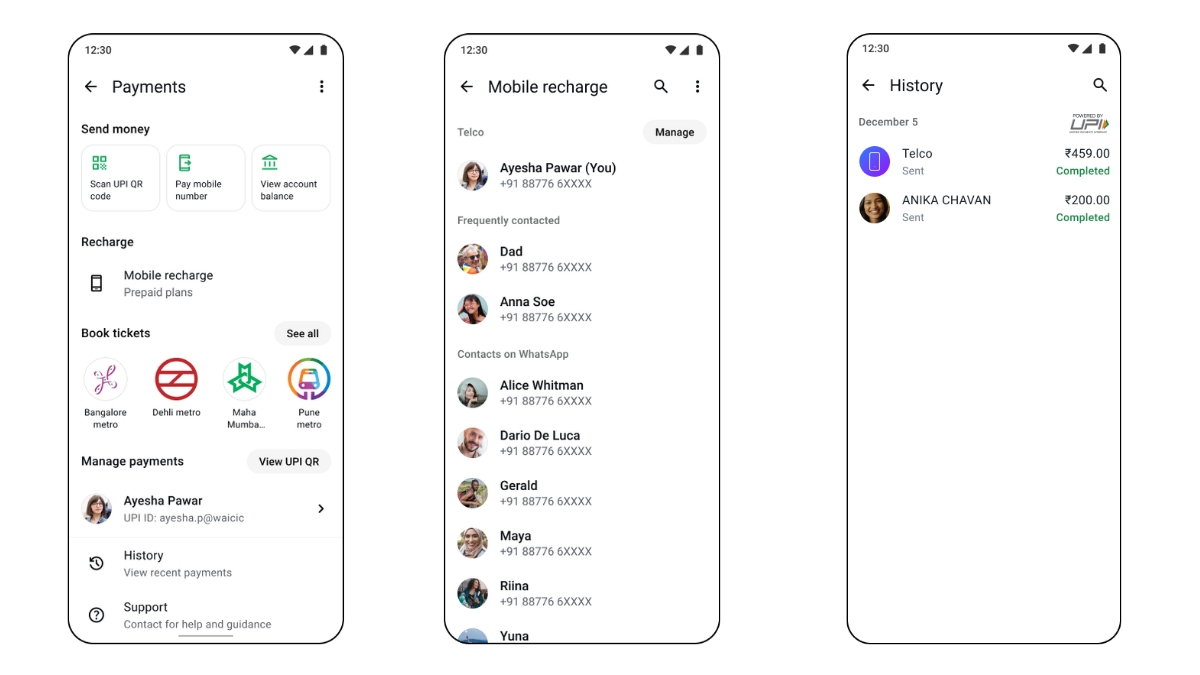
Previously, the WhatsApp Payment option allowed users to send money, scan QR code, view account balance or book metro tickets. Well, WhatsApp users can now even recharge their prepaid mobile numbers within the app.
Users can either recharge their own number or their family/friends without leaving the app. Currently, you can recharge only the prepaid number from major telecom operators, including Reliance Jio, Bharti Airtel, and Vodafone Idea.
You can select your preferred recharge plan and complete payments within a few taps. After a successful recharge, you will see a confirmation screen with plan details in WhatsApp. You can also view the transaction in your history at the bottom of the payments homepage.
The feature is being rolled out gradually to Android and iOS users and is expected to be rolled out to all users in the coming weeks.
How to recharge your mobile number?
Android/iOS
- Tap More Options.
- Select Payments.
- Select Mobile recharge.
- Tap the mobile number you want to recharge and select the operator/circle. Supported operators are Airtel, Jio, and Vodafone. You can recharge any number included in your phone carrier plan.
- Choose a recharge plan and tap Select this plan.
- Review the bill > Continue to payment.
- Select UPI as the payment method.
- To confirm the payment, tap Select payment.
- Authenticate the transaction by entering your UPI PIN.
- Done.
Other than UPI, you can also select debit cards or credit cards as payment methods. With this new feature, WhatsApp continues to expand beyond a messaging app.