
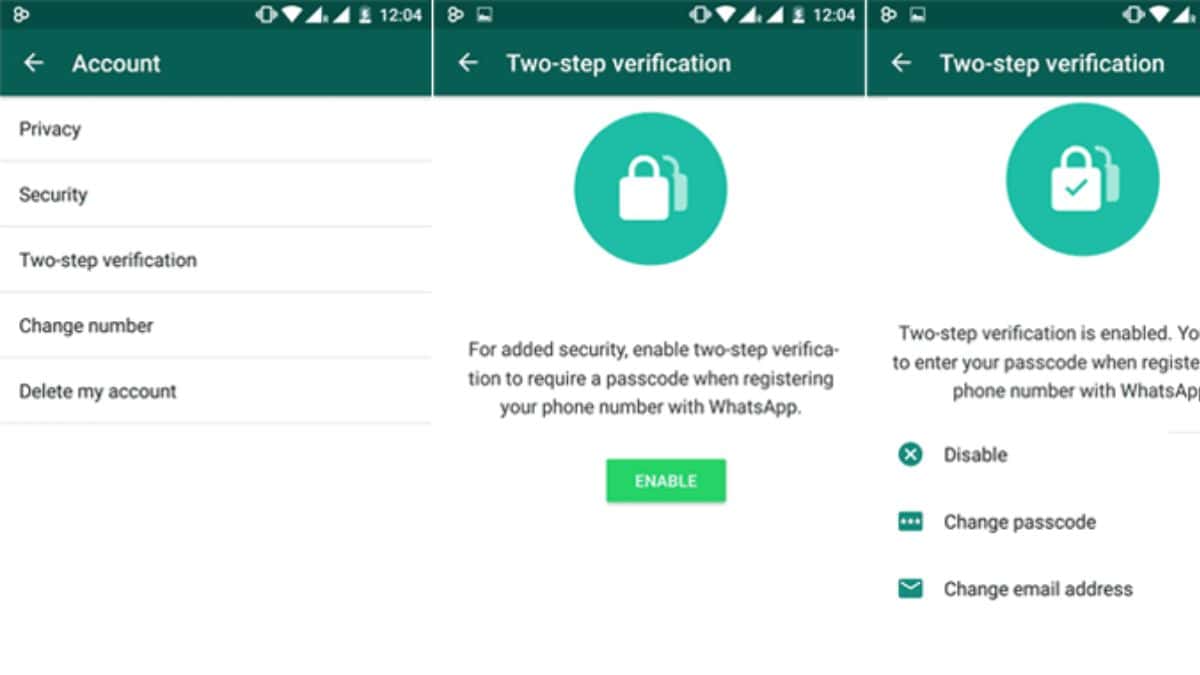
Whatsapp is the most common app for messaging family, friends, and professionals. As it has a huge chain of exchanging information it needs higher security to protect its data. Whatsapp continuously makes every possible innovation for the safety of its users. Recently Whatsapp announced Two-step-verification and said that “Your personal messages need more protection”.
Meet two-step verification 👋
Your personal messages deserve more protection 💪
Two-step verification lets you make a PIN, so when someone tries to access your account from a new device––they're blocked 🛑 Learn more: https://t.co/sLh4cwjKED pic.twitter.com/4ndKBXWELo
— WhatsApp (@WhatsApp) September 7, 2022
With two-step verification, you can create a PIN that prevents someone from accessing your account from a new device if they enter the wrong PIN. Within WhatsApp, you can modify the two-step verification settings. The two-step verification mechanism can be enabled or disabled, the PIN can be modified, and the email address linked to it can be changed. You will need to wait 7 days before you can reset your PIN if you don’t add an email address and you lose it. Make sure you enter an accurate email address you can access as WhatsApp does not validate the email address to confirm its accuracy.
One can enable Two-step-verification through the following process:
- Go to WhatsApp Settings.
- Select Account > Enable Two-Step Verification.
- Choose a six-digit PIN and enter it. Then, confirm it.
- If you don’t want to add an email address, select Skip. Otherwise, enter a valid email address that you can access. It is advised to add an email address because it enables you to reset two-step verification and improves account security.
- Click Next.
- After verifying the email address, click Save or Done.