Earlier, to use WhatsApp on a tablet, users needed to opt for companion mode, where they opened the “Linked Devices” section on their phone to scan the QR code shown on the tablet. However, users were not allowed to share their location from their tablet or send a message to a broadcast list. Also, if the primary device is inactive on WhatsApp for 14 days in a row, WhatsApp logs out the tablet too for security reasons.
According to a report by WABetaInfo, WhatsApp is now testing a standalone mode for Android tablets that allows users to make the Android tablet their primary device.
https://twitter.com/WABetaInfo/status/2072954832525176966
WhatsApp testing a standalone mode for Android tablets
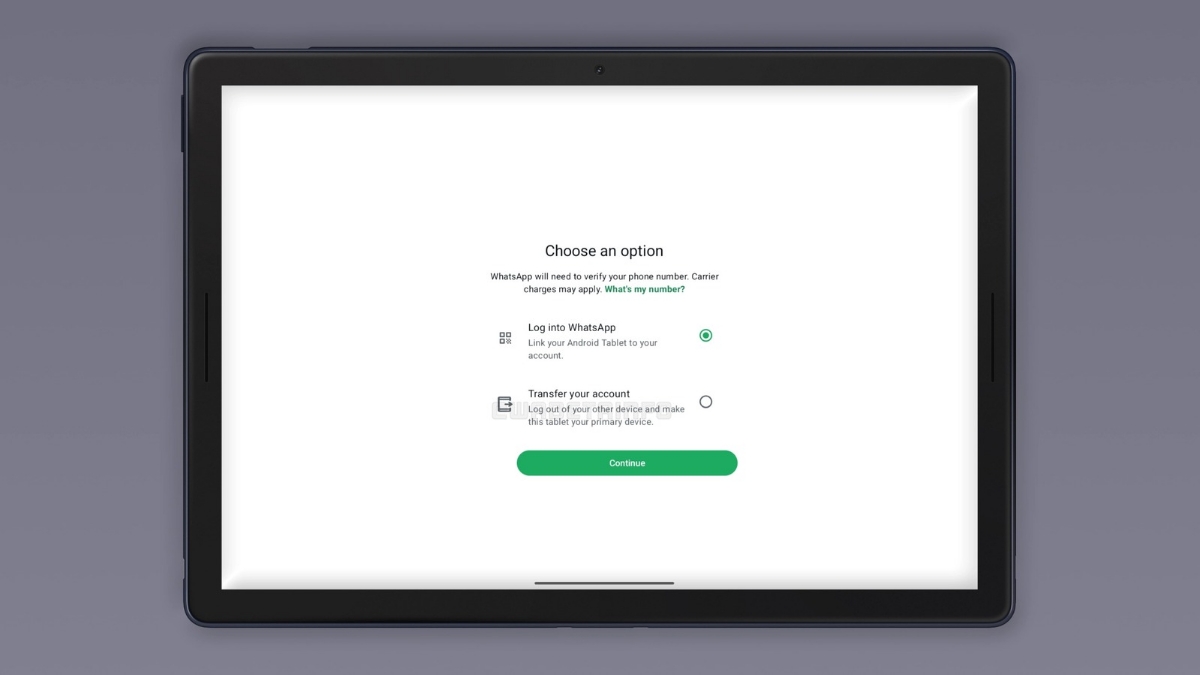
According to the report, some WhatsApp beta testers can access a new screen when they open WhatsApp on their Android tablets for the first time. The screen is called “Choose an option”, and it gives users two paths to follow: first is to link the tablet to an existing account as usual, and second is to allow users to transfer their account.
The second option lets users set the tablet up as their primary device. This feature is currently available to a limited number of beta testers, and it is said to roll out to more beta users in the coming weeks.
How to transfer your account to an Android tablet?
Tap the “Transfer your account” option and follow the steps that appear. WhatsApp will ask for your country code and phone number, then send a 6-digit code to verify your identity. Once you enter that code, the Android tablet takes over as the primary device.
After the setup, you can restore your chat from Google Drive to get all your previous conversations back on the tablet.
When you make the tablet your primary device, WhatsApp log out of the previous primary device automatically, as an account can have only one primary device. If users still want to use WhatsApp on their phone, they can link it by scanning the QR code. Meanwhile, they can also transfer the account back to the phone at any time.
Once set up as a primary device, there are no features restricted for the tablet, and the 14-day logout also does not apply to the tablet. This means you get the same WhatsApp experience on your tablet that you earlier got on your phone. However, the companion mode is still available on Android tablets.
In related news, WhatsApp has already rolled out a similar option for iPad users with the WhatsApp Messenger 26.25.74 update.