
Samsung is rolling out a new update for the Theme Park app, keeping the upcoming One UI 9 custom skin in mind and bringing enhanced customization options and improvements for Galaxy device users.
Read more about the update below.
Theme Park Update Features for One UI 9
Samsung has now released the latest version 1.1.02.01 of the Theme Park app, and it is now available for eligible Galaxy device users via the Galaxy Store. The new update brings three major improvements, along with general bug fixes and usability enhancements.
Speaking more, the first improvement that has been added with the latest Theme Park update is enhanced keyboard customization. With this, users running One UI 9.0 beta, which is currently available for the Galaxy S26 series in select global regions, will be receiving new keycap designs for the Samsung Keyboard, thereby giving them more options to customize the keyboard as per their preference.
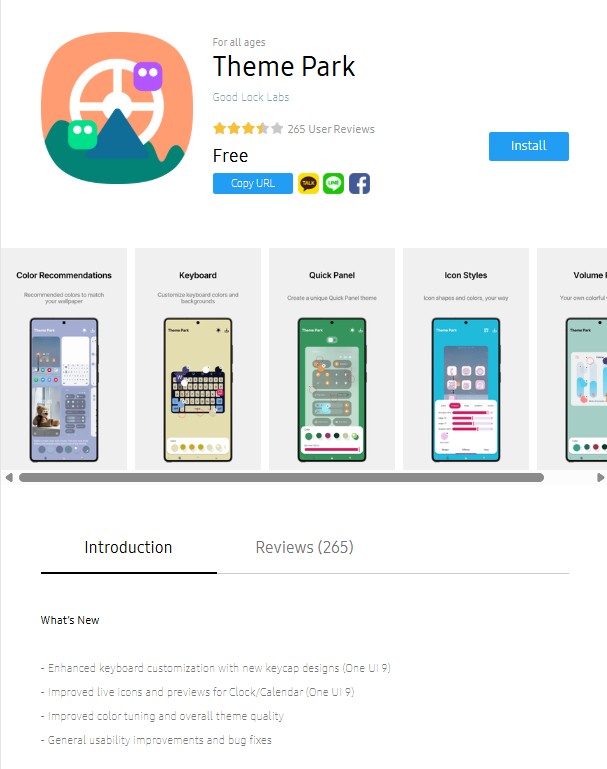
Also to add, the Theme Park app is also receiving improved live icons and previews for Samsung’s stock Calendar and Clock applications. Earlier, when users applied a theme pack to app icons, there were chances that the Calendar and Clock icons may not display the current date and time correctly. This issue is now said to have been improved with the latest update.
Furthermore, Samsung has also improved color tuning and the overall theme quality with the new Theme Park version. Notably, this particular improvement will not be limited to One UI 9 devices only, and will also be available for Galaxy devices running earlier One UI versions as well.
As of now, the latest Theme Park update is available via the Galaxy Store, and users can check for the new version from the store itself.