Sharing stories on Instagram is a way to let your friends or family know about your cherished moments, favorite content and more. Well, you can now make your Instagram stories more creative and attractive to remove an unwanted element, add an effect, start a trend, and more with the help of Meta AI.
Restyle Instagram Stories using Meta AI
Remove unwanted items and add some flair
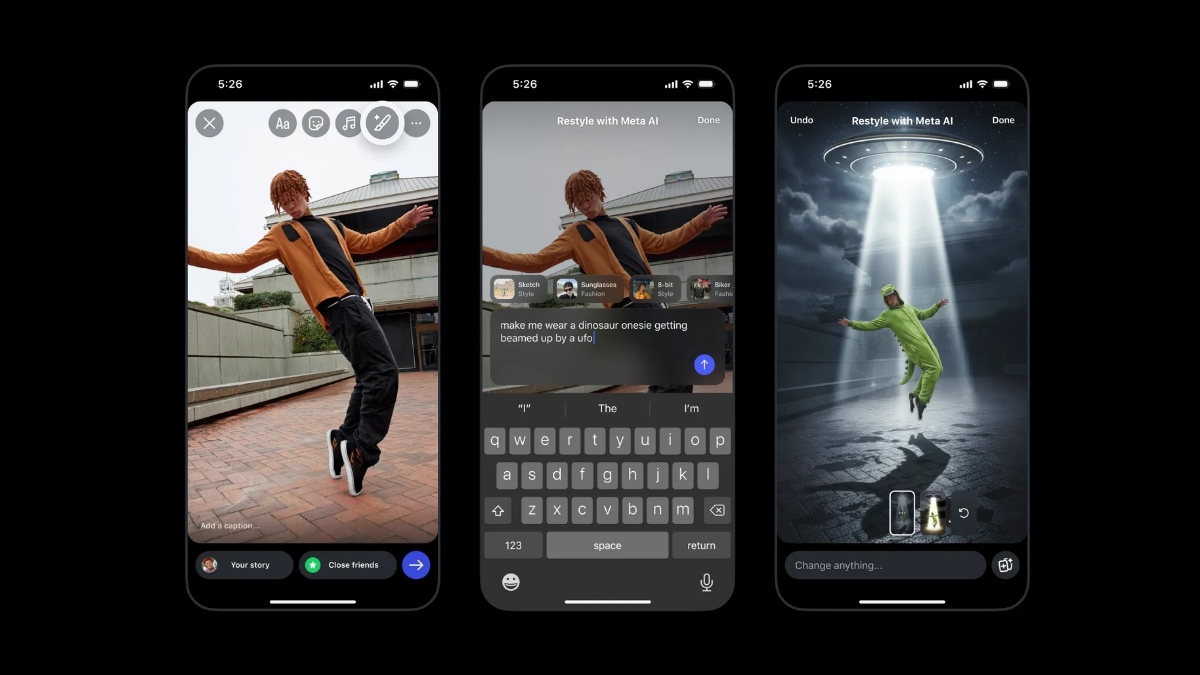
You can now easily restyle your photos and videos in IG stories and make your content your own by removing or adding elements. With the remove feature in restyle, you can get rid of unwanted elements from the background of your photos. With the add and change features, you can easily prompt Meta AI to create your vision, whether it’s asking to change your hair color, adding a crown or some balloons, or adding a sunset background to your selfie.
Preset effects
You can use preset effects like sunglasses, a biker jacket, or even black clothes to transform your outfits. You can also change the whole style of the image to make it look like a watercolor or film noir. There are also several preset effects for short videos. You can transform the style, background, and outfits in your videos. You can turn your whole video into an underwater landscape, add fire and flames all around, or even add snow.
How to write prompts
The more specific and detailed your prompt, the better Meta AI can match your vision. This will help users in editing photos just the way they want.
Use the Add Yours sticker
Using Add Yours stickers will make it easy for friends to use the same edits you made. You can get inspiration from your friends or start your very own viral trend. If you want others to be able to make the same edits, apply an Add Yours sticker, which you can access by swiping up on your restyled image before sharing to your story.
Also, if you see an image that was restyled with an Add Yours sticker, you can click on Add Yours, select the image you want restyled from your camera library, and then post.
To restyle your photos:
- Click on the + on your profile photo to select an image from your camera roll to add to your story.
- After selecting your photo, click on the restyle icon in the top tray.
Make edits to your image by either:
- Choose Add, Remove, or Change, and then describe what you want to edit.
- Typing into the prompt bar at the bottom the edits you want.
- Scrolling to select one of the preset effects above the prompt bar.
- Clicking on the browser icon in the bottom right for even more preset effect options.
- Once your new image is generated, you can click “Done” before sharing your story.
To restyle your videos:
- Click on the + on your profile photo to select a video from your camera roll to add to your story.
- After selecting your video, click on the restyle icon in the top tray.
- Select a preset effect.
- Once your new video is generated, you can click “Done” before sharing your story.