In June 2025, Adobe unveiled a new experimental camera app for iPhone users called Project Indigo. The app aimed at offering a refined photography experience relying on computational photography and AI capabilities, thereby ensuring images with greater depth and detail.
Just a few days back, the company announced that the Nextcam team at Adobe is adding an experimental AI Playground inside the Indigo camera app.
AI Playground added in Project Indigo
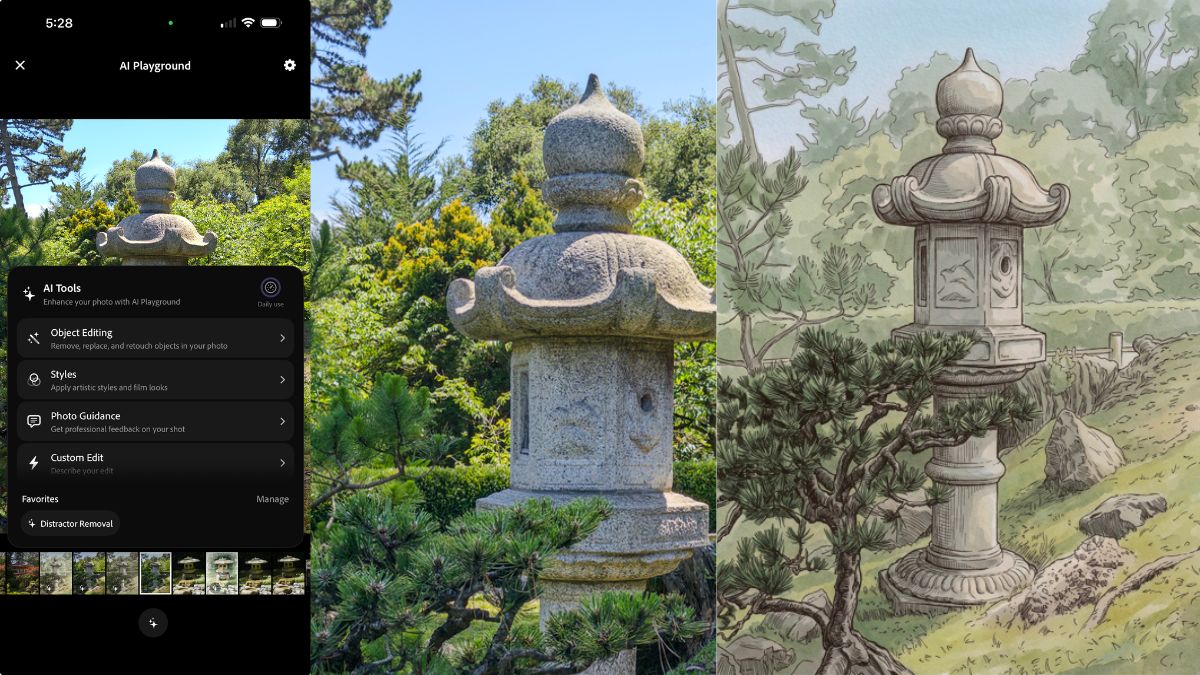
The initial version offers buttons for removing distractors, adding a shallow depth of field, applying photographic and artistic styles, changing the lighting and many other functions. It also provides buttons that return a critique of your photo, including suggestions for reshooting or editing. It also includes a Custom Edit button, which lets you enter an arbitrary text prompt.
How to use the AI Playground?
Since Project Indigo is an experimental app, and this is an experimental feature, AI Playground is available for free, with no sign-on required. However, the level of free access will be available only for a few per cent of users and only for a few weeks.
Depending on its success, the company may extend the experiment, expand the user pool, or run follow-on experiments. If the feature proves popular, it will eventually be offered in a paid version.
When you update to Project Indigo version 1.1 and re-launch the app, you may see a splash screen announcing the availability of AI Playground. To take part, you must agree to share with Adobe your button presses while using the Playground. Your prompts and uploads will not be used by the company. If you prefer not to participate in the experiment, there’s a button for declining; you can then continue using the app as before.
To use the Playground, after capturing a photo and reviewing it with Indigo’s built-in filmstrip (or full-screen grid), press the sparkle button at the bottom of the screen. (Look for the stars.) The company restricts the Playground to photos captured using our app, so if the sparkle button is grayed out, it means this is not an Indigo photograph.
The Playground contains four sections: Object Editing, Styles, Photo Guidance, and Custom Edit. Each section contains multiple buttons or toggles, which trigger GenAI with prompts engineered for them.
AI Playground Sections
- Object Editing: Contains buttons for distractor removal and defocusing the background to create a shallow depth of field. Within distractor removal is a list of toggles that allow you to remove one or more categories of distractors. You can also add categories by typing (or dictating) what you want removed, and you can save or delete these additions.
- Applying Styles: The Styles menu of AI Playground contains buttons that will re-render your Indigo photo using a variety of techniques.
- Photo Guidance: Analyses photos and provides editing and reshooting suggestions while users are still at the shooting location. The company is also working on customising suggestions for individual smartphone models and lenses. The company is exploring composition and cropping recommendations using additionally captured ultra-wide photos or videos.
- Custom Edit: Allows users to create edits using their own text prompt. Prompts can be typed or dictated, then edited, saved or deleted. AI Playground buttons use Adobe-engineered prompts, and users can repeat an operation to generate another variation.
The Nextcam team at Adobe is starting with Google’s Nano Banana, but may switch models over time, or give different models to different users. The company may also use different models for different buttons, including one of its own Firefly models.
Since Nano Banana is a cloud-based model, you need to be connected to the internet to use AI Playground. Generated images are returned at approximately 2K resolution to reduce transmission and processing time.
The company has also informed users about certain points:
- If the generation fails due to server issues, Adobe will let you know, and you should try again.
- If you violate one of Nano Banana’s AI safety filters, either because of your input image or your prompt, Adobe will let you know that as well.
- If you violate their safety standards too often, Adobe will remove you from the experiment.
- Current leading image-generation models output standard dynamic range (SDR) images, so using Nano Banana to edit the HDR photos captured by Indigo’s camera app produces an image that looks disappointingly bland on the small screen, at least compared to the HDR photo.
- To address this limitation, the team has built a custom ML model to post-process the standard dynamic range (SDR) images returned by Nano Banana, boosting them back to HDR.
- To improve the accuracy of this boosting, the team uses your captured HDR photo as guidance (but doesn’t train the model on your photos),
What’s next?
The Nextcam team is developing some exciting non-GenAI computational photography features that are planned to launch soon. Areas under development include: Generative editing controls, reducing Identity shift in photos and on-device AI models.
Project Indigo’s AI Playground was developed by Mohammad Haque, Boris Ajdin, Ruiming Cao and Marc Levoy, with the help of Nextcam.