Till now, WhatsApp Business account users were able to set up cover photos for their accounts, but this feature was not available for personal accounts.
Folks at @WABetaInfo have shared that WhatsApp is rolling out the profile cover photo feature for personal accounts to some Android beta testers.
WhatsApp rolling out the profile cover photo feature for personal profiles on Android beta
The profile cover photo feature was discovered with the WhatsApp beta for Android 2.26.43.11 update, which is available on the Google Play Store. This feature allows personal accounts to enable the same customisation available on business accounts.
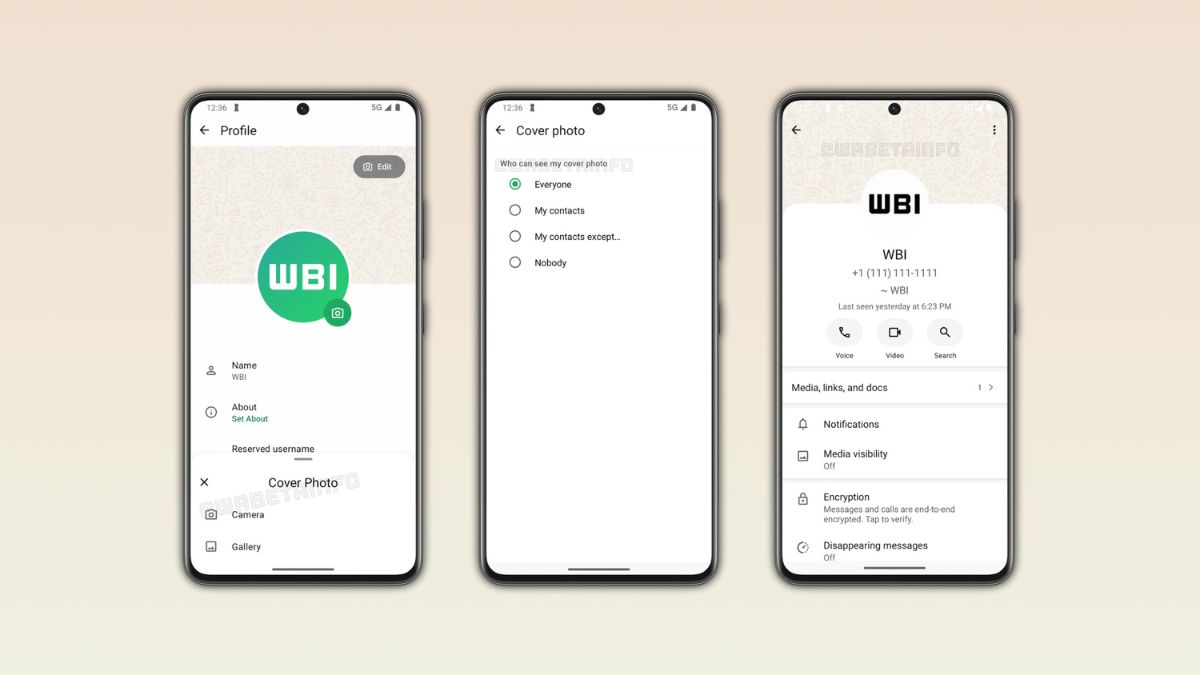
The cover photo appears as a landscape banner at the top of the profile page. The update does not replace the profile picture. The cover photo also appears at the top of the app settings, so users can see it every time they open this section. When users do not choose a cover photo, WhatsApp shows a default image until they set one.
How to set a cover photo?
To set a cover photo, tap the Edit button on your profile page. A menu will appear where users can choose how to set up the cover photo. Users can take a new photo, choose it from the gallery, or use Meta AI to generate one.
Once a photo is selected, WhatsApp will automatically crop it to fit the landscape format. WhatsApp gives users full control over who can see their cover photo: Everyone, My contacts, My contacts except and Nobody. The default option is “Everyone”, so any user can see the cover photo unless you change the setting.
The cover photo appears above the profile picture, the name, and the phone number. WhatsApp won’t show the cover photo in the chat info screen if privacy settings do not allow it.
It has not announced when this feature will be rolled out to all users.