

The scheduled messages feature was previously available on Instagram and allowed users to compose a message and set a future date or time to deliver that message automatically.
This feature is now officially introduced for WhatsApp as well.
WhatsApp introduces scheduled messages
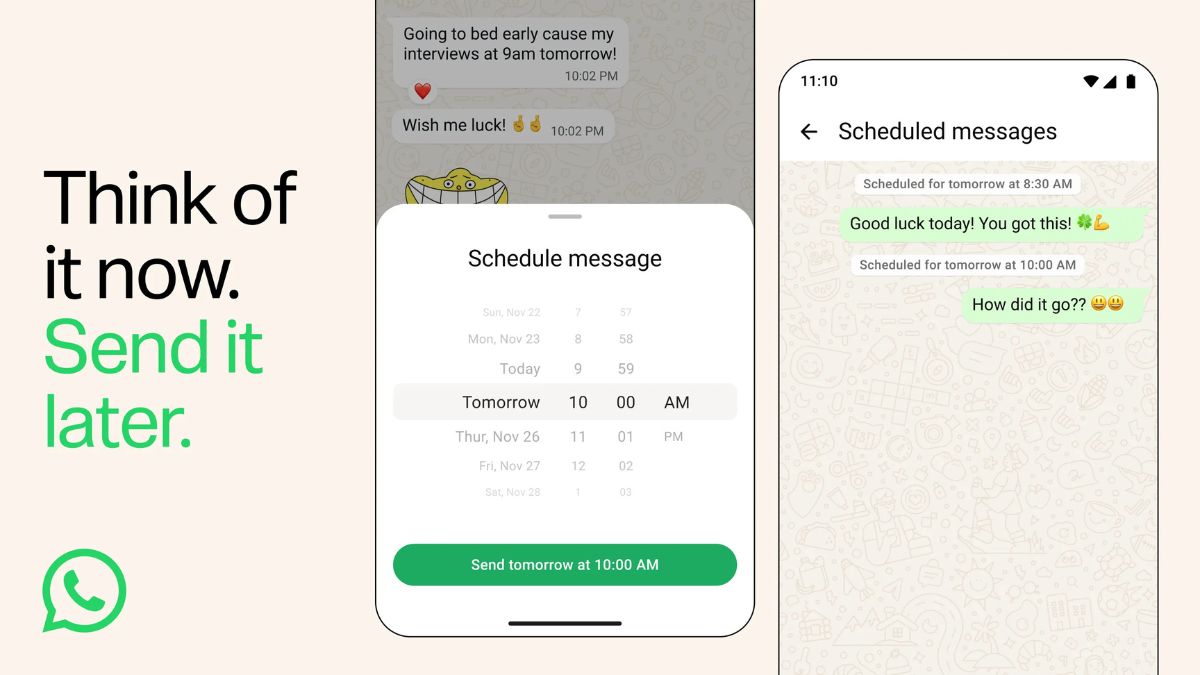
With scheduled messages, you can write a message when you think of it and send it anywhere from 10 minutes to 14 days later, in both your 1:1 and group chats.
This feature is helpful for situations when a user thinks of a message at an inconvenient hour or across different time zones, like a good luck message or a birthday wish. Even if your phone is off or out of battery, your scheduled messages will still show up at the time you choose, and they remain end-to-end encrypted like all your personal messages.
How to schedule a message?
- Press and hold the send button
- Pick the date and time you want it to arrive
Scheduled messages will look like any other message to the person receiving it, and you can see all future messages you have lined up and delete them beforehand if you change your mind.
Availability
Scheduled messages work with text, photos and videos, and are rolling out globally over the coming weeks.