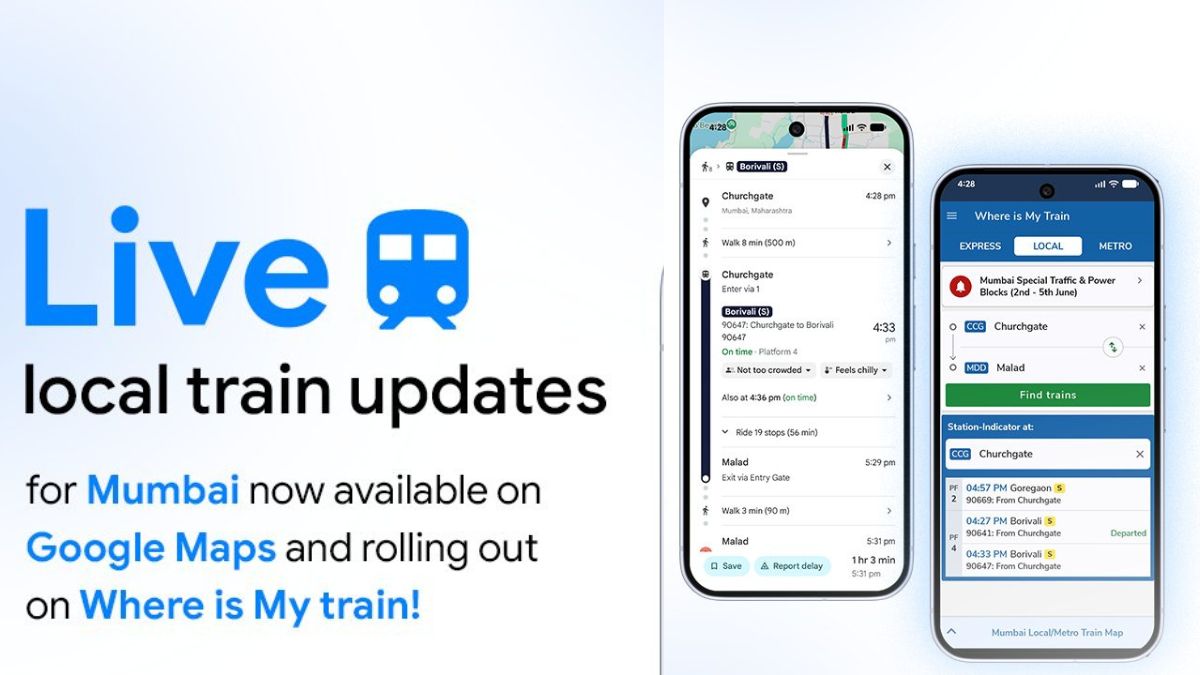
We have already come across many Google Maps-related updates in the past, and now, a new update has been shared by Google India for Mumbai users. Live local train updates for Mumbai users have now been made available on Google Maps, while the same is also rolling out on the Where Is My Train app.
Read more about the update below.
Google Maps – Live Local Train Updates for Mumbai Users
Via this new update, users will be able to track their train in real-time, get schedule adjustment updates, and also know about platform changes instantly, helping them avoid last-minute rush during their daily commute. While this is currently available on Google Maps and is also rolling out to the Where Is My Train app, it is limited to users in Mumbai only. However, it would be nice to see this feature being made available for other regions as well.
Speaking more, in a post shared on X by Google Maps, the company has also detailed that this has been made possible because of the data shared by Yatri Railways, which is an official Mumbai local app by Indian Railways.
Additionally, users who have not downloaded the Google Maps app can follow the below steps to get the app on their iOS and Android devices.
For iPhone or iPad users:
1. Open the App Store on your device and tap on the Search tab at the bottom.
2. Type Google Maps in the search bar and tap on search.
3. Once the official Google Maps app appears, tap on Get and authenticate using Face ID, Touch ID, or Apple ID password to download the app.
For Android phone or tablet users:
1. Open the Google Play Store on your device.
2. Tap on the search bar at the top and type Google Maps.
3. Once the official Google Maps app appears, tap on Install to download it.
For the Where Is My Train app in Mumbai, Android and iOS users can follow the below steps.
For Android Devices:
1. Open the Google Play Store on your phone and type “Where Is My Train” in the search bar.
2. Look for the official app developed by Sigmoid Labs and its Affiliates/Google, tap on Install, and wait for the download to finish.
3. Once done, tap on Open to launch the app.
For iOS Devices:
1. Open the App Store on your iPhone or iPad, tap on the Search tab, and type “Where Is My Train”.
2. Find the official app published by Google, named “Where Is My Train – by Google”.
3. Tap on Get and confirm the installation using Face ID, Touch ID, or your Apple ID password.
Stay tuned for more updates.