

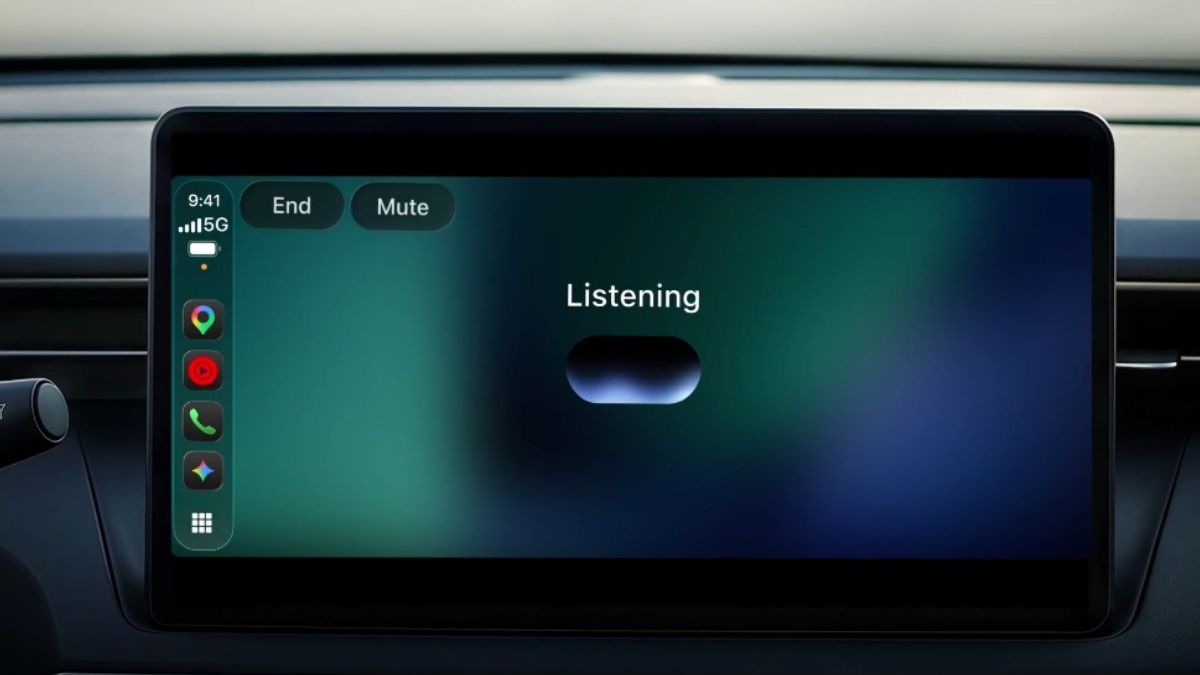
After releasing the Gemini app for Android Auto and cars with Google built-in, Google is now bringing the Gemini app directly to Apple CarPlay.
The Gemini app is now available directly on Apple CarPlay. iOS users can have free-flowing conversations with Gemini Live right from their car’s display, hands-free.
Use Gemini in CarPlay to catch-up on what you have coming up in your schedule, talk through your inbox, or… pic.twitter.com/1s4luZ6q0v
— Google (@Google) November 11, 2026
Gemini app available for Apple CarPlay
When you tap the Gemini app icon on your CarPlay screen or side rail, you can easily pick up where you left off with a recent chat or start a fresh conversation. You can talk back and forth with Gemini at your own pace- interrupting to add a detail, changing the subject, or pausing when you need to focus on an exit.
Gemini on CarPlay helps you be more productive during your ride:
- Get ready for the day ahead: Use your morning commute to see what’s coming up and walk into your first meeting prepared. Ask Gemini what’s on your calendar, when you need to leave for your next appointment, or talk through what you want to say before you arrive.
- Talk through your inbox: Because Gemini connects with your Google Workspace apps like Gmail and Google Calendar, you can ask for your daily brief, catch up on unread emails, get quick summaries of long email threads, and talk through a quick reply using just your voice.
- Explore local spots and landmarks: Ask Gemini for recommendations in the area you’re heading to, from a quick place to grab lunch to the backstory on a local landmark.
- Brainstorm, rehearse, and learn out loud: Use Gemini Live as a sounding board to practice an upcoming presentation, prepare for a tough conversation, or break down a complex topic you’ve been curious about.
CarPlay conversations sync automatically with the Gemini app on your iPhone; every summary, note, and brainstorm is there in your chat history the moment you park.
Availability
Gemini on Apple CarPlay is rolling out globally to all Gemini users on iOS across every supported Gemini Live language.
To get started, make sure you’ve updated to the latest version of the Gemini app on your iPhone, enabled microphone permissions, and used Gemini Live on your phone at least once. The next time you connect your phone to your car, tap the Gemini icon on your CarPlay display, then start a new conversation or pick up a recent one.