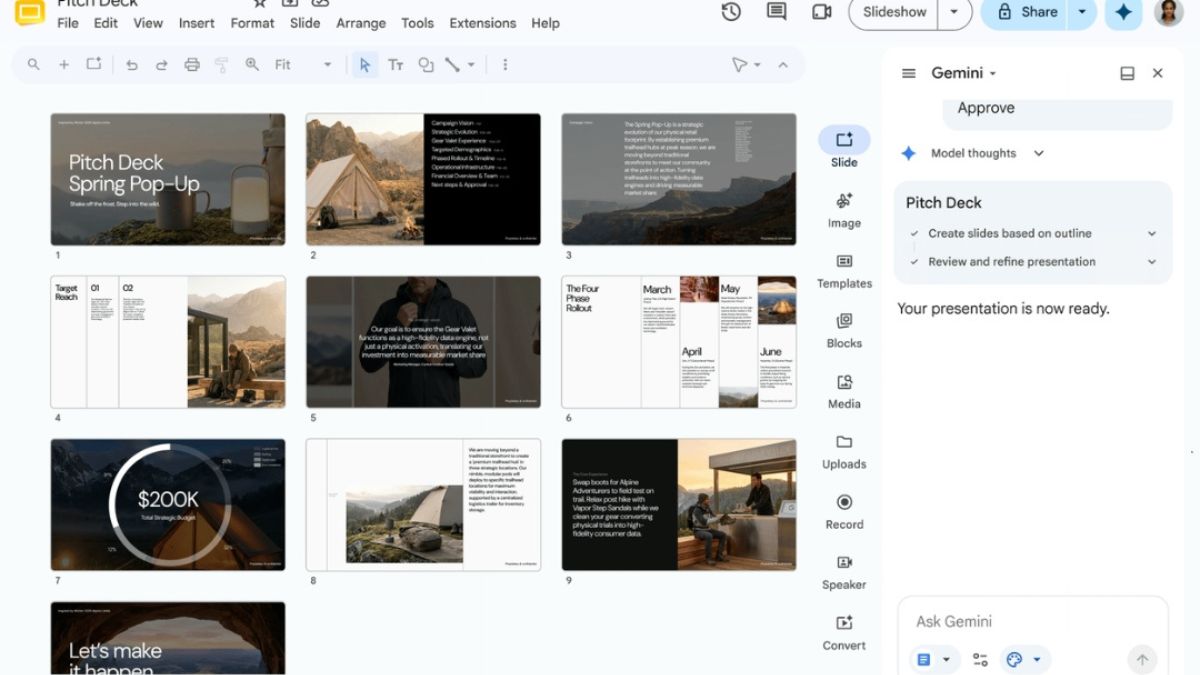
Creating presentations can be hectic when you have a huge amount of data and less time. Well, Google now has an easy AI-powered solution for this problem. Users can now create a full, multi-slide presentation using Gemini in Google Slides.
Gemini in Google Slides
With a single prompt, you can ground the presentation in existing content from Google Drive, match the style of another presentation, and build fully editable slides, allowing you to make any necessary adjustments. Apart from this, Gemini will also suggest relevant files, emails, and chats that you can choose to add to enrich your presentation.
How to use Gemini in Google Slides?
- Add a prompt: In the Slides side panel, add a prompt to generate a presentation.
- Ground it in your content: Add as many reference files directly from Drive as you need to provide context.
- Stay on-brand: Attach an existing deck to use as a style reference to ensure your presentation matches your desired look and feel.
- Refine the plan for your presentation: Answer any follow-up questions to refine the presentation’s tone, style, content, or audience. You will also have the chance to edit or approve the presentation outline before the actual slides are created.
Do note that, at launch, this feature will be supported in English only. Also, through at least August 1, 2026, Workspace customers will get promotional access to higher limits for creating multi-slide presentations using Gemini in Google Slides, allowing users to experiment with this feature.
Users will see a notification when they use this feature to inform them of the limited higher promotional access. A per-user usage limit will apply after August 1.
Availability
- Business: Business Standard and Plus
- Enterprise: Enterprise Standard and Plus
- Consumer: Google AI Pro and Ultra
- Education add-ons: Google AI Pro for Education
- Other Add-on: AI Expanded Access (users with AI Expanded Access add-on licenses will have higher limits on usage of Gemini in Slides, once promotional limits are no longer in effect).