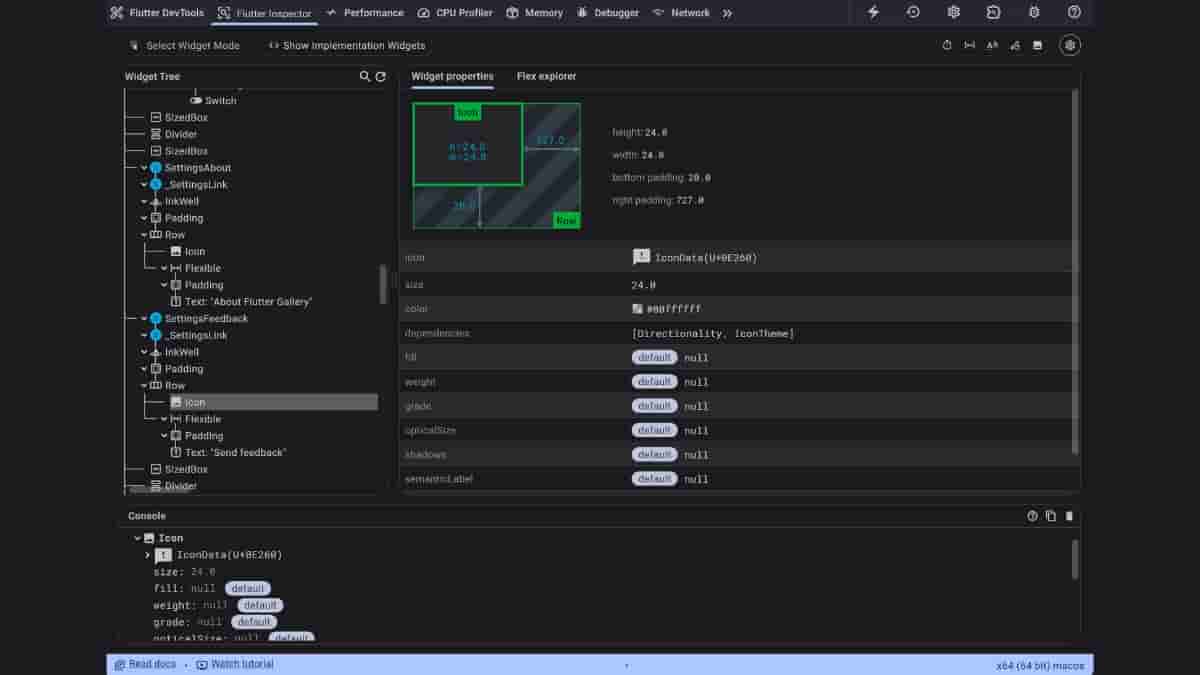
Flutter is a UI toolkit developed by Google for building beautiful, natively compiled, multi-platform applications from a single codebase. Recently, Flutter 3.29 upgrade has been released, and this brings updates to DevTools, making UI inspection and analysis even easier.
UI debugging just got a serious upgrade. ⬆️
The new DevTools Inspector is now enabled by default in Flutter 3.29. It comes with a condensed widget tree, automatic updates with hot-reload, and a more performant log viewing experience with richer metadata. pic.twitter.com/AGY0LMpkeg
— Flutter (@FlutterDev) May 2, 2025
The new DevTools inspector is now enabled by default. It has a condensed widget tree providing a clearer view of your app structure, a Widget properties view giving you insights into your widgets at a glance while you also have the option to automatically update in response to hot reload and navigation events. The inspector helps you visualize and explore Flutter Widget trees and can be used for understanding existing layouts or diagnosing layout issues.
If you enable Widget Selection mode from the DevTools inspector, any selection on the device is considered a widget selection until you exit Widget Selection mode. The on-device button now lets you quickly exit Widget Selection mode.
The inspector also provides several options for visually debugging your app, like slow animation, show guidelines, show baselines, highlight repaints, and highlight oversized images.
It is revealed that the Logging tool has some updates too. Log now displays richer metadata like severity, categories, zone, and isolate. There is also added support for filtering by severity level
Run flutter upgrade to unlock these DevTools enhancements. Also, this default setting can be disabled from the inspector settings dialog.