Recently, Google introduced a new upgrade for AI Mode in Chrome that will save you from tab-hopping while searching for a topic or item on your mobile.
We’ve upgraded your search experience in Chrome. Now you can use inputs like open tabs and images when you search with AI Mode in Chrome on your phone.
Learn more: https://t.co/zTYgDrSt6s pic.twitter.com/UFgnP4bjDB
— Chrome (@googlechrome) May 21, 2026
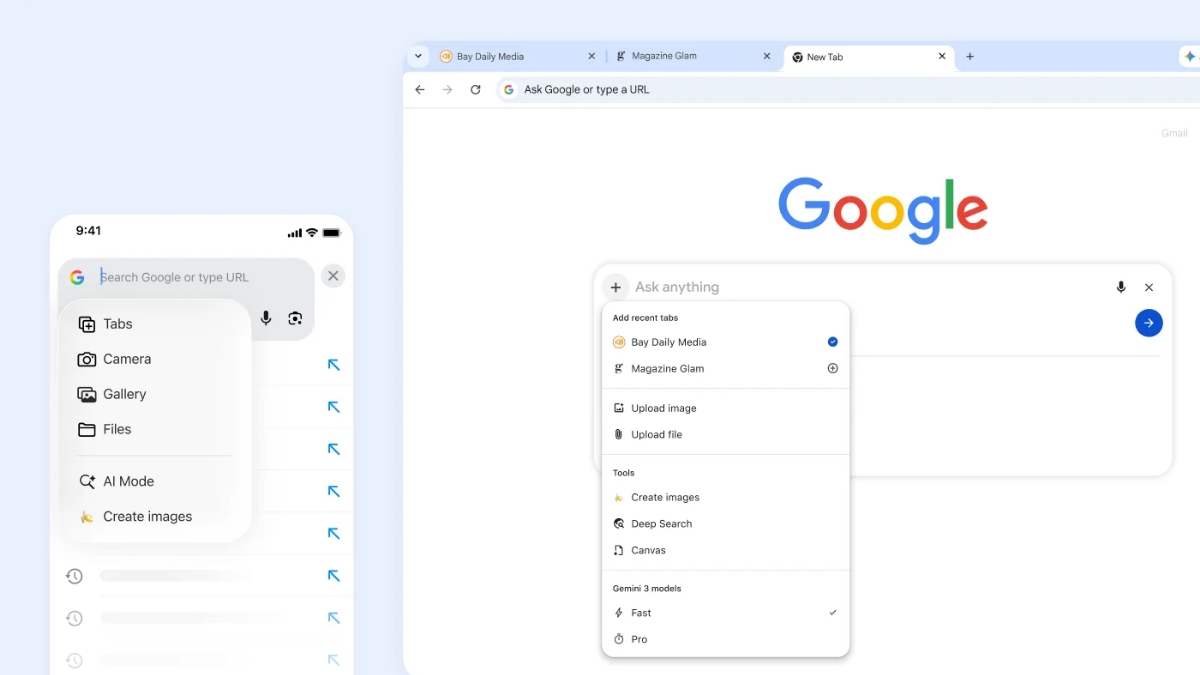
On Chrome mobile, you can tap the new “plus” menu in the search box on the New Tab page (or the existing plus menu within AI Mode) to select recent tabs and add them to your search. Users aren’t limited to one type of input, either: you can now mix and match multiple tabs, images or files (like PDFs) and bring that context into your AI Mode searches.
For example, if you are studying for a statistics midterm, you can bring in context from open tabs with your class notes, lecture slides and academic papers and ask for more examples to illustrate a tricky concept. AI Mode will use those tabs to provide a tailored response and suggest more sites to explore.
With advanced multimodal capabilities, AI Mode can deeply understand your question, no matter how complex it is. Users can ask anything with AI Mode in Chrome and keep the conversation open alongside their tabs as they dive deeper.
Stay tuned with The Tech Outlook for the latest tech updates.