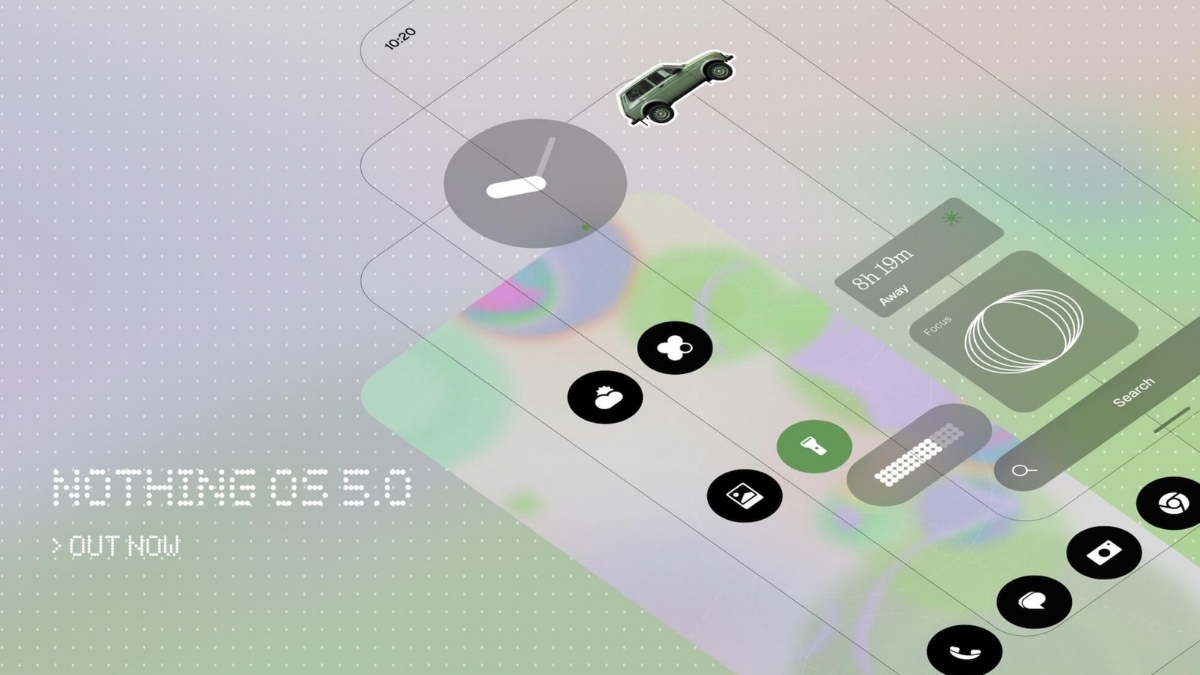
Yesterday, Nothing officially unveiled its latest software iteration, Nothing OS 5.0. The new upgrade comes with a major design refresh, faster and smoother animations, improved Essential AI tools and more.
Nothing OS 5.0 brings a major design refresh, a more adaptive home screen, new ways to use widgets, faster and smoother animations, improved Essential AI tools and the best of Android 17.
Open Beta starts tomorrow with Phone (3). pic.twitter.com/W5Hdk9np0S
— Nothing (@nothing) August 25, 2026
What’s new in Nothing OS 5.0?
Refreshed design
Nothing OS 5.0 introduces a wider visual refresh across the system. Typography, icons, spacing, materials and motions have been refined across Settings, Status Bar, Camera, Gallery, widgets and system controls.
New system typeface
Geist is introduced as the new system typeface. It improves legibility across everyday parts of the interface, while giving Nothing OS a clearer and more distinctive visual character. Combined with refinements to text scale, spacing and hierarchy, it creates a more consistent visual language across Settings, widgets, menus and other parts of the OS.
Redesigned Settings
Settings has been redesigned with new icons, updated spacing and corner shapes, and more consistent layouts. Information is grouped more clearly.
Cleaner status bar
The Status Bar gets custom-designed system icons and more expressive animations. Signal, WiFi, battery and other indicators are clearer and more consistent, while subtle animations give more immediate feedback as their states change.
Camera updates
Camera introduces updated icons, cleaner controls and more polished motion, making important controls easier to identify without distracting from the viewfinder. QR code is also easier to use. Once a QR code is recognized, its result stays in a fixed position rather than moving with the code in the frame.
Nothing Gallery updates
The main Photos view can now be sorted by Recently added or Captured date, with your selection remembered across sessions. You can also filter by All, Favourites, Edited, Photos, Videos or Screenshots, and sorting and filtering can be used together.
The Albums page has also been redesigned. Frequently used albums can sit more prominently, while less-used albums appear in a smaller section below. Long-press and drag an album to reorder it or move it between sections, or use Edit mode to manage multiple albums at once. Transparent details also appear across parts of Gallery.
Deeper personalization
Wallpaper-adaptive colour, new lock screen styles, widgets and easier home screen editing all build on that, giving you more ways to make the phone feel like yours without turning the experience into a mix of unrelated styles.
Redesigned home screen (Coming with the general release)
A new theme introduces transparent details across widgets and Search to add depth and layering, with the same material language extending across first-party experiences such as Gallery.
App icons receive subtle colour tints based on your wallpaper. Widgets can use adaptive colour alongside transparent details, while 1×1 Quick Settings widgets use colours drawn more prominently from your wallpaper.
The redesigned home screen will be available as an additional theme alongside the existing Nothing OS style rather than replacing it.
Lock Screen personalisation
The lock screen gets two new clock faces and more colour options.
Gooey offers a bold, playful look with fluid forms and stronger personality.
Micrographics brings the things you need throughout the day into one glanceable clock face. Date, time, weather and upcoming meetings are brought together through a distinctive, mechanical-inspired typographic style.
You can also choose clock face colours from your wallpaper, helping the lock screen feel more connected to the image behind it.
Depth wallpaper improvements
Depth Effect wallpaper gives you more control over composition, letting you reposition and scale the image around the clock and other lock screen information. If the image doesn’t fill the available area, blur and translucent effects extend it around the edges without leaving awkward gaps.
Easier home screen editing
Instead of moving every icon or widget one by one, you can select multiple items and move them together, including across different home screen pages.
Away Time widget
Away Time tracks the periods when you put your phone down, helping you observe how your time away from the screen changes over time.
Rather than setting limits or blocking apps, the widget lets you see patterns in your own behaviour, such as your longest breaks and how often you step away, giving you a different perspective on your relationship with your phone.
Collector Widget
Capture something with your camera or choose a photo from Gallery, then keep, organise and display those items on your home screen and lock screen.
Dedicated Glyph app
The Glyph Interface now has its own dedicated app. Supported Glyph features, sounds, ringtones and schedules are brought together in one place.
Glyph Timer Widget
Glyph Timer can now be started directly from your home screen using a new widget.
Faster and smoother
Nothing OS 5.0 improves the interactions you repeat every day, including app launches, scrolling, touch response, multitasking and background app behaviour.
More Natural animations
Supported animations now respond when you reverse direction midway through an interaction. These are interactions you repeat constantly, so making them respond more directly to your touch helps the whole system feel more fluid.
Faster Bluetooth Controls
Bluetooth controls have been redesigned in Quick Settings, making nearby devices easier to find and letting you connect or disconnect supported devices with a single tap.
Essential AI Tools
Essential Voice
It better understands when speech should remain a paragraph and when it should become a list, helping separate tasks, requirements or ideas into clearer points while preserving what you said.
Real-time transcription also shows words as you speak, so you can see the transcription taking shape rather than waiting until the recording is complete. Coming later this year, real-time translation will make it easier to follow and understand conversations across languages as they happen.
And with Ear (3), you can now capture audio directly through Super Mic using the earbud case, giving you another way to quickly record something without holding your phone.
Essential Space
Using the Essential Key to capture content is now simpler and more consistent, with the interaction flow refined across the experience.
Smart Collections help organise scattered captures with less manual work. Model Context Protocol support allows compatible AI platforms to search and read selected information from your Essential Space.
For the initial release, MCP support is read-only, so supported tools cannot write to or modify your Essential Space data. MCP support for Essential Space will roll out through Google Play in October.
Essential apps
With Nothing OS 5.0, Essential Apps Builder moves onto your phone as an app. Describe the tool you need in natural language, preview what’s created, refine it and deploy it directly to your home screen without writing code.
Essential Apps Builder remains in beta, with access gradually expanding to more users.
More control across the system
- Separate Notifications and Quick Settings into dedicated panels
- Enhanced Quick Share
- Improved screen recording with a floating action capsule
- Clearer privacy indicators with a new three-color indication system: Green, Blue and Yellow
- Location Permission updates include live updates in the Status Bar
- Noto 3D emoji
- Expanded Dark Theme to more apps
- Digital Assistants now have their own volume control
- Enhanced HDR brightness
- Recents screen introduces a pill-shaped menu at the top of each app card
The redesigned Launcher and Micrographics clock face are still under development and won’t be available in Open Beta. Both will arrive with the general release.
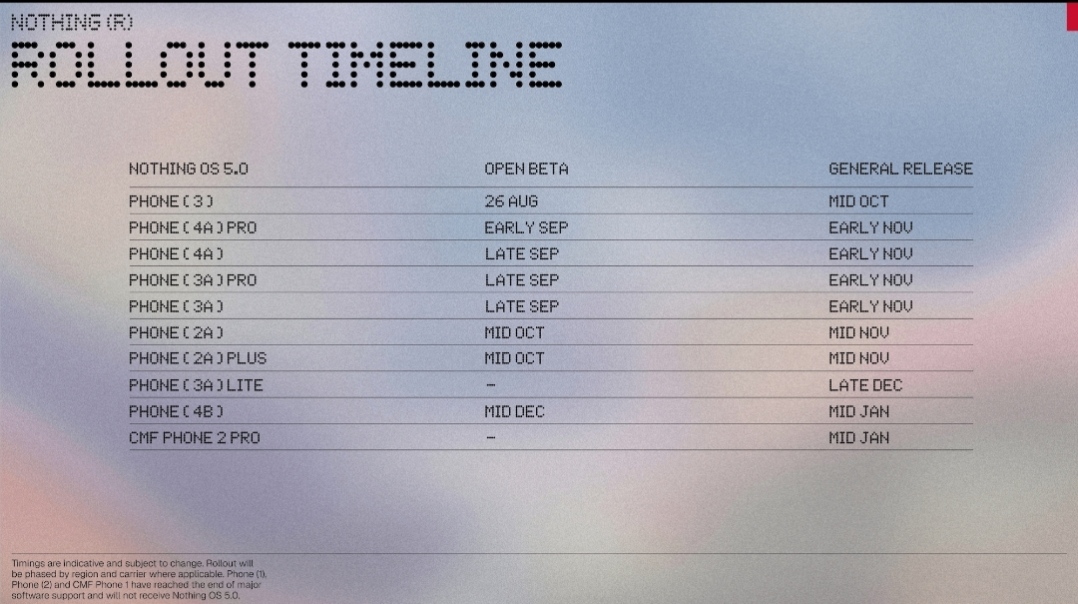
Open Beta Rollout Timeline
Nothing OS 5.0 Open Beta starts today at 11:00 BST, beginning with Phone (3). Check out the current rollout timeline below.