

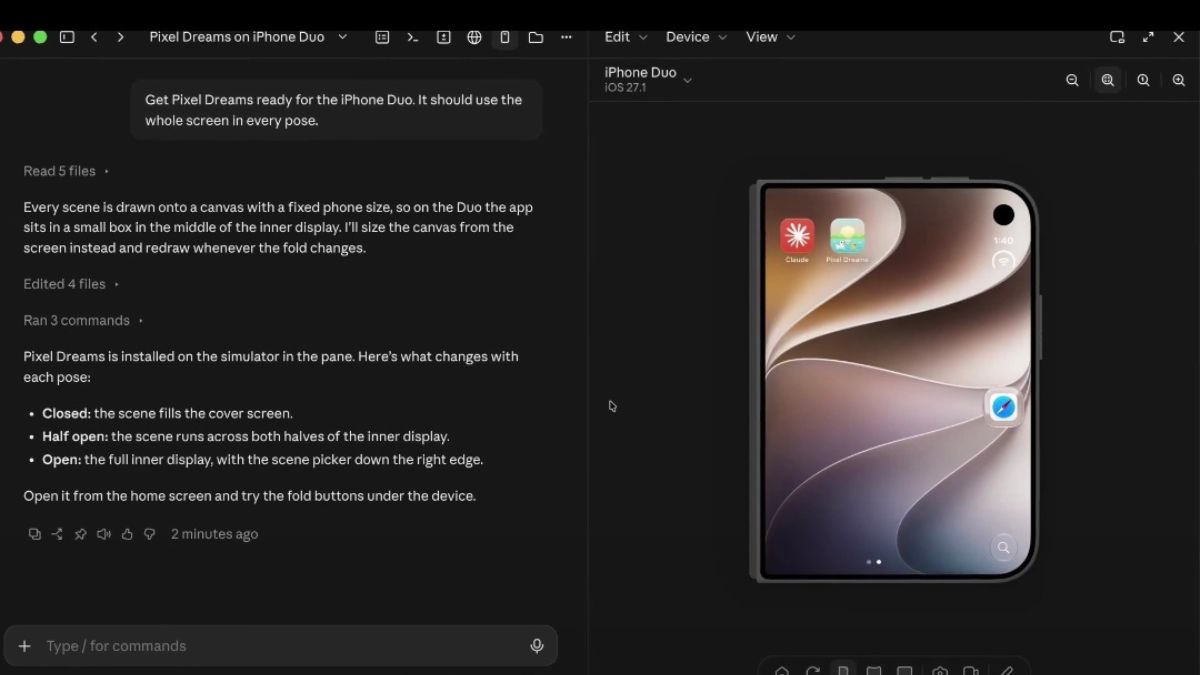
Yesterday, it was announced that Claude Code on desktop now supports iPhone Duo in the iOS simulator.
Claude Code on desktop now supports iPhone Duo in the iOS simulator (public beta).
You can run your app on Duo next to your conversation and Claude can fold and unfold the device to test each layout. pic.twitter.com/ZwM3ZpvjBh
— ClaudeDevs (@ClaudeDevs) November 16, 2026
Claude Code on desktop supports iPhone Duo
The iOS simulator pane shows your app running in Apple’s iOS simulator next to your conversation in Claude Code Desktop. When Claude builds, installs, launches, or checks your app in a simulator, the pane opens automatically and streams the device screen live. Developers can use it to watch Claude run and test their app, or to tap through the app yourself while Claude keeps working.
You can test your app on an iPhone Duo simulator in the simulator pane and fold the device into each of its poses: closed, half open, and open. To test on one, you need:
- Claude Desktop v4.29.0 or later, which is newer than the v1.24012.0 that the simulator pane itself requires. To update, open Claude> Check for updates…, then restart the app.
- Xcode 27.1 or later with its iOS simulator runtime, which includes the iPhone Duo simulator. For Xcode 27.1, that runtime is iOS 27.1. If it’s missing, download it from Xcode’s Components settings. If you have more than one Xcode installed, select Xcode 27.1 or later.
To open an iPhone Duo in the pane, name it in your request or switch the pane to it yourself. If the device menu doesn’t list an iPhone Duo yet, select Add simulator… at the end of the list of devices and choose an iPhone Duo device type.
Fold an iPhone Duo
- Fold it yourself: click one of the three pose buttons next to the rotate button. Hold the pointer over one to see its name: Closed, Half Open or Open. For an angle between those poses, move the pointer over the pose buttons, then drag the slider that appears above them.
- Ask Claude to fold it: ask for one of the three poses, or for a half-open hinge angle from 1 to 179 degrees.
Before a layout check on an iPhone Duo, Claude may ask whether to export Xcode’s agent skills to your personal skills folder. These skills come with Xcode to guide coding agents, and once they’re in that folder, Claude Code loads them in your other projects too. They include a skill for getting your app’s layout ready for the iPhone Duo.
Claude drives simulated devices only and can’t control a physical iPhone or iPad. To test on one, run the app on it from Xcode yourself, then describe what you see or attach a screenshot to the conversation for Claude to work from.
The iOS simulator pane is in public beta in Claude Code desktop on macOS. It’s available on Pro, Max, Ultra, Team and Enterprise plans except in Enterprise organisations that have a HIPAA configuration enabled.