


Meta-owned WhatsApp has begun rolling out a new feature called “Strict Account Settings” globally. In an official press release, Meta said the new feature adds an extra layer of privacy and is aimed particularly at journalists and public figures, who are more likely to be targeted in cyberattacks.
With Strict Account Settings enabled, users will be able to automatically block attachments and media from unknown senders, silence calls from people they don’t know, and apply additional restrictions that may slightly limit certain app functions in favour of stronger privacy protection.
WhatsApp’s Strict Account Settings – How to enable it?
To enable this feature, users need to open WhatsApp and go to Settings (on both Android and iOS). From there, tap on Privacy, scroll down, and select Advanced. Inside this section, you should see the “Strict Account Settings” option, which can be turned on with a single tap.
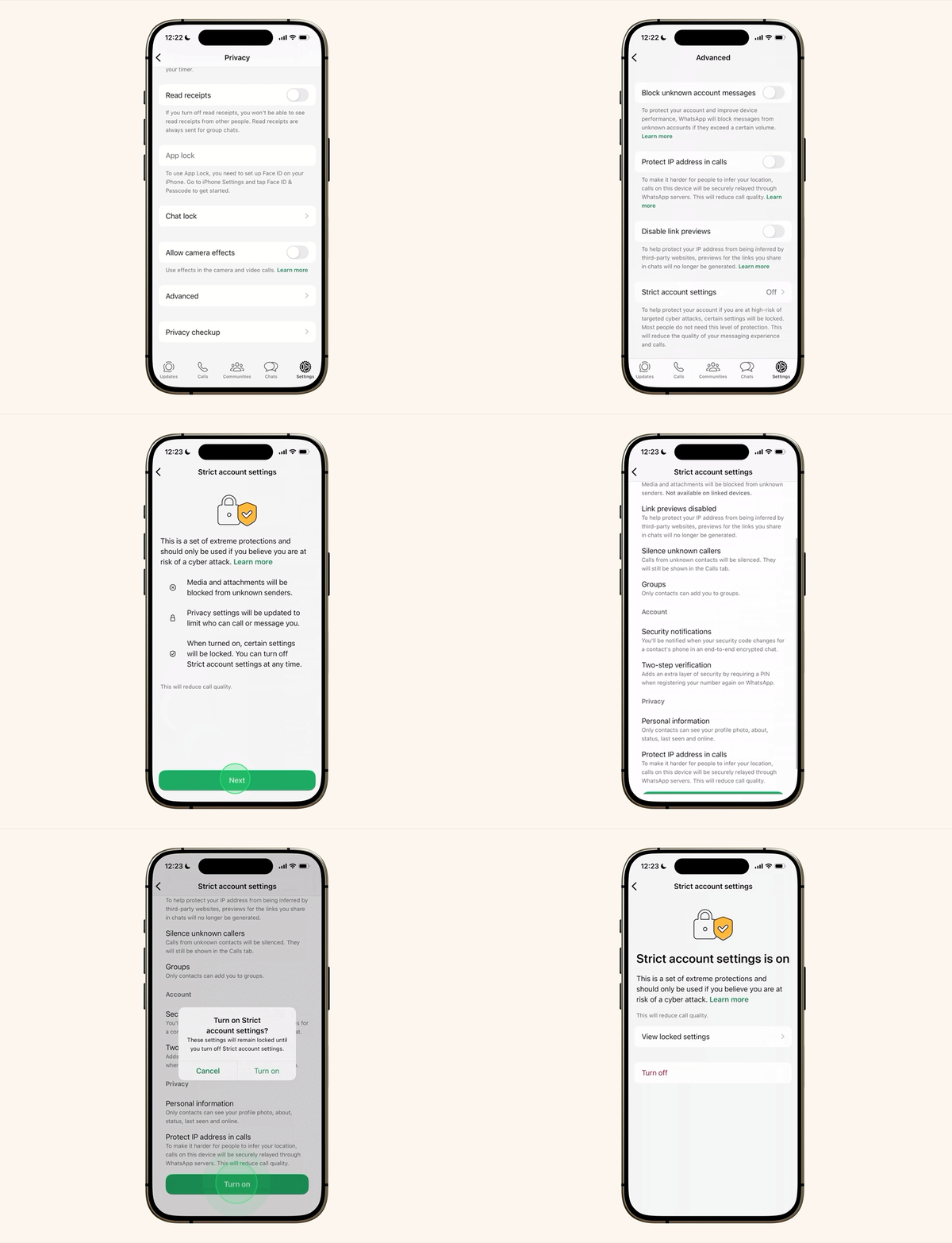
However, at the moment, this option is not yet visible for many users. Currently, the available options under Advanced include Block unknown account messages, Protect IP address in calls, and Disable link previews. These can already be enabled by toggling the switch next to each option, and they still offer useful privacy benefits.
Since the rollout is still in progress, the Strict Account Settings feature is expected to become available to more users soon.ble to more users soon.

