



Last month, Telegram introduced a new interface design for iOS that fully supports the Liquid Glass visual style. And now this month, Android users are also getting a new UI that gives a Liquid Glass look.
Telegram for Android: New UI
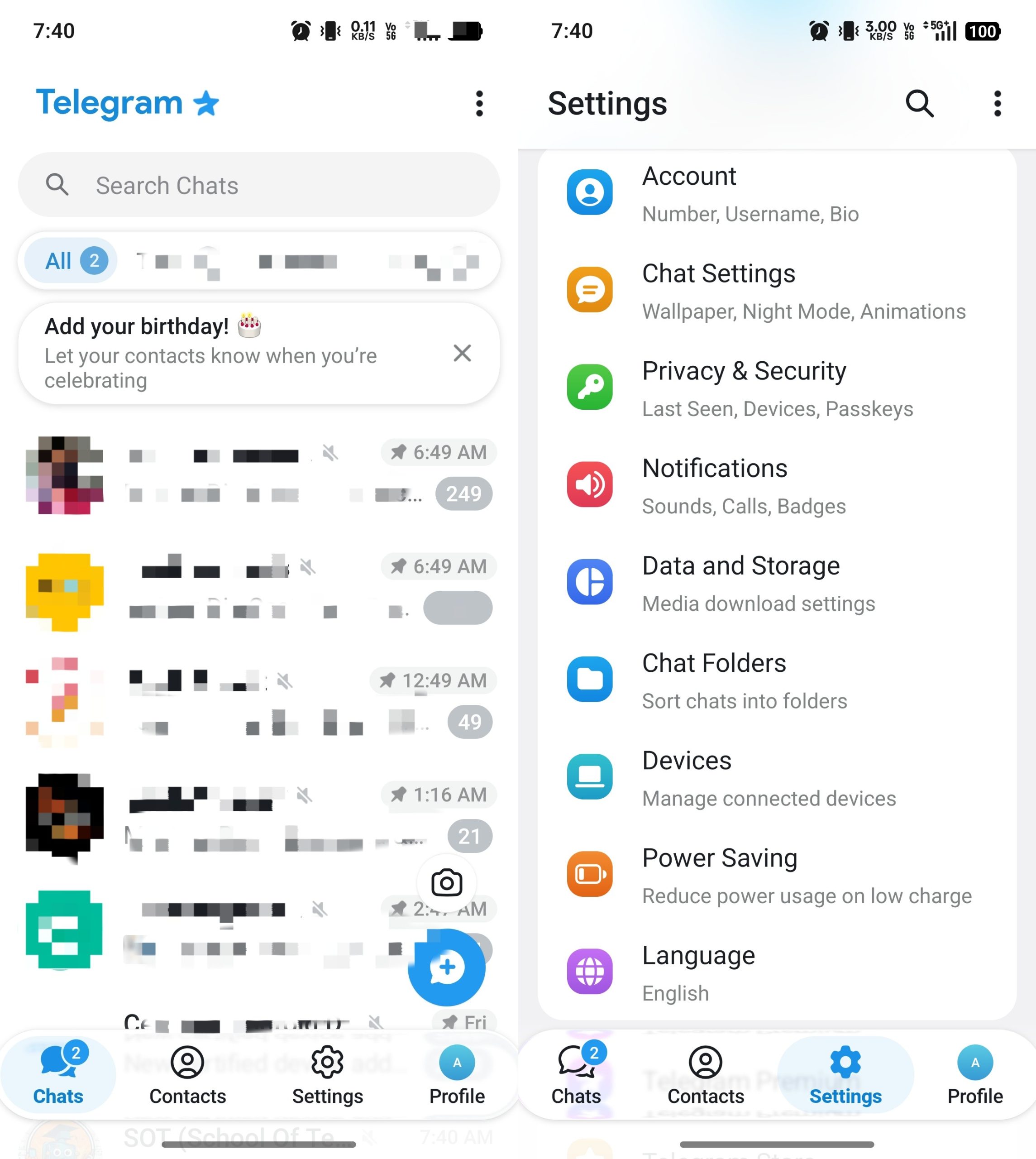
The new UI looks cleaner and more polished. There are rounded chat cards across the app, with a translucent blur background. The bottom side now includes a navigation bar with four items: Chats, Contacts, Settings, and Profile.
The “Search chats” option has become a full bar, replacing the search icon. Meanwhile, the hamburger menu has been shifted from left to right, probably for easier access. Telegram has tweaked the design of Settings with colour-coded icons, making the interface more visually streamlined. There is also a new Search icon that will help users easily find the required settings.
This new update blurs the difference between Android and iOS as the new Android design closely mirrors the iOS version of the app.
Reports suggest that, with the latest UI, Telegram is allowing users to post stories. Users can access the Stories feature from the Chats screen, which lets them capture photos, videos or select one from the gallery. There are also various customisation options available that can be used while posting stories.
Stay tuned with The Tech Outlook for the latest tech updates.
