



Is your Apple MacBook device showing the ‘Finish Your Lid Angle Sensor Repair’ error and are you wondering what to do now? Well, you have landed on the right page as we will be helping you with how to tackle this situation.
Dive into it right below.
Tackling the ‘Finish Your Lid Angle Sensor Repair’ Error on Apple MacBook
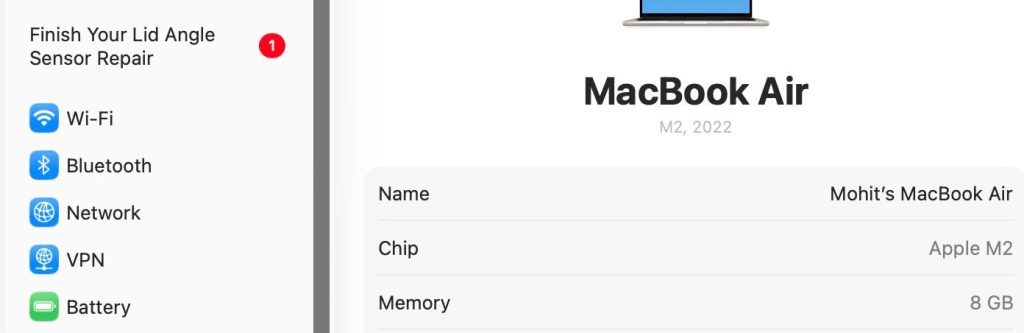
So the first thing to do after getting the ‘Finish Your Lid Angle Sensor Repair’ error on your MacBook is to visit the ‘Settings’ page and find it listed at the top-left corner of the screen.

Click on ‘Finish Your Lid Angle Sensor Repair’ and wait for the next window to pop up.
On the window that appears, you will find under ‘Configuration Available’ the option to ‘Restart & Finish Repair’ of the Lid Angle Sensor. Tap on it and then follow the on-screen instructions that are shared in the subsequent steps.
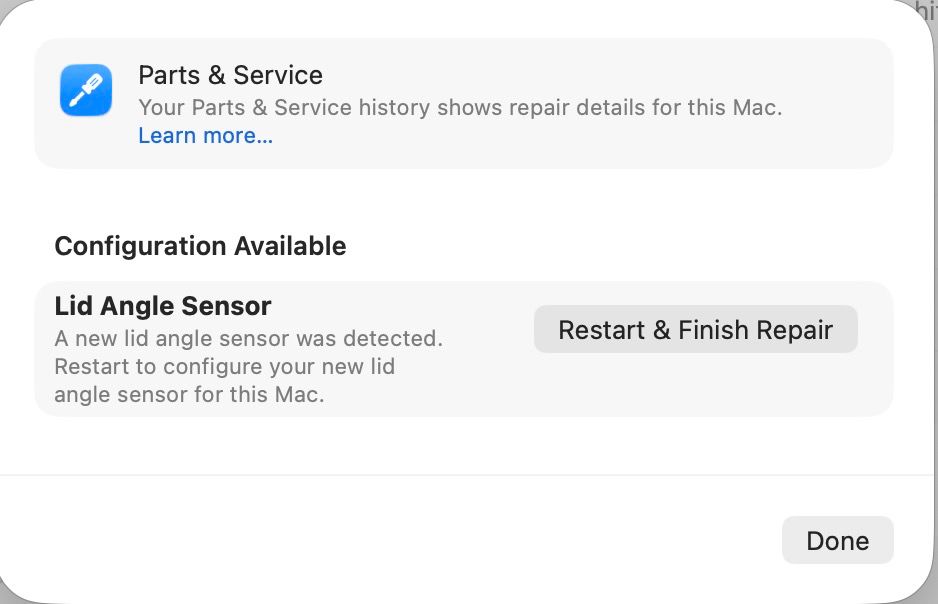
Afterwards, the system will be asking you to open as well as close the lid for the purpose of calibration. If successfully completed, the ‘Finish Your Lid Angle Sensor Repair’ error will go from the ‘Settings’ page. However, if by chance the error still persists, the next best thing to do is to take your MacBook to an authorized Apple Store and get it fixed by the professionals.
Speaking of a recent update, an M5-powered MacBook Pro model from Apple (model number – ‘A3434’) was spotted on the FCC certification database, and reportedly the M5, M5 Pro, and M5 Max variants of Apple’s MacBook Pro are soon going to enter mass production. Regarding the launch, based on certain reports, it may only be taking place some time in 2026 (next year).
Stay tuned for more updates.
