

Nothing fixes Google Fast Pair vulnerability issue on 2025 audio models; Ear (1) update to take longer

A serious security issue has been found in Google’s Fast Pair feature, known as “WhisperPair” (CVE-2025-36911). The vulnerability was discovered by researchers at Belgium’s KU Leuven University in August 2025 and was reported to Google around the same time, before being publicly disclosed on January 15–16, 2026. The disclosure raised concerns because the flaw could allow someone nearby (within roughly 14 metres) to take over a connection, listen to audio, or potentially track users. The issue affects a wide range of wireless headphones, earbuds, and speakers that rely on Fast Pair, with the impact extending across products sold by 10 brands, including Sony, Jabra, JBL, Marshall, Xiaomi, Nothing, OnePlus, Soundcore, Logitech, and Google itself. Google has already rolled out updates for its Pixel devices to address the issue.
Nothing has also confirmed that it has fixed the vulnerability across several of its audio products. The details were shared by Zac, a community admin, in an official post on the Nothing Community page.
According to the post, the company has already completed the fix for multiple Nothing and CMF audio devices released in 2025. These include the Nothing Ear (3) running firmware version v1.0.1.67, Nothing Headphone (1) on v1.0.1.80, CMF Buds Pro 2 with v1.0.1.72, CMF Buds 2 on v1.0.1.50, CMF Buds 2 Plus on v1.0.1.52, CMF Headphone Pro updated to v1.0.1.44, and Nothing Ear (open) on v1.0.1.28. Users are advised to check that their devices are on these versions or newer.
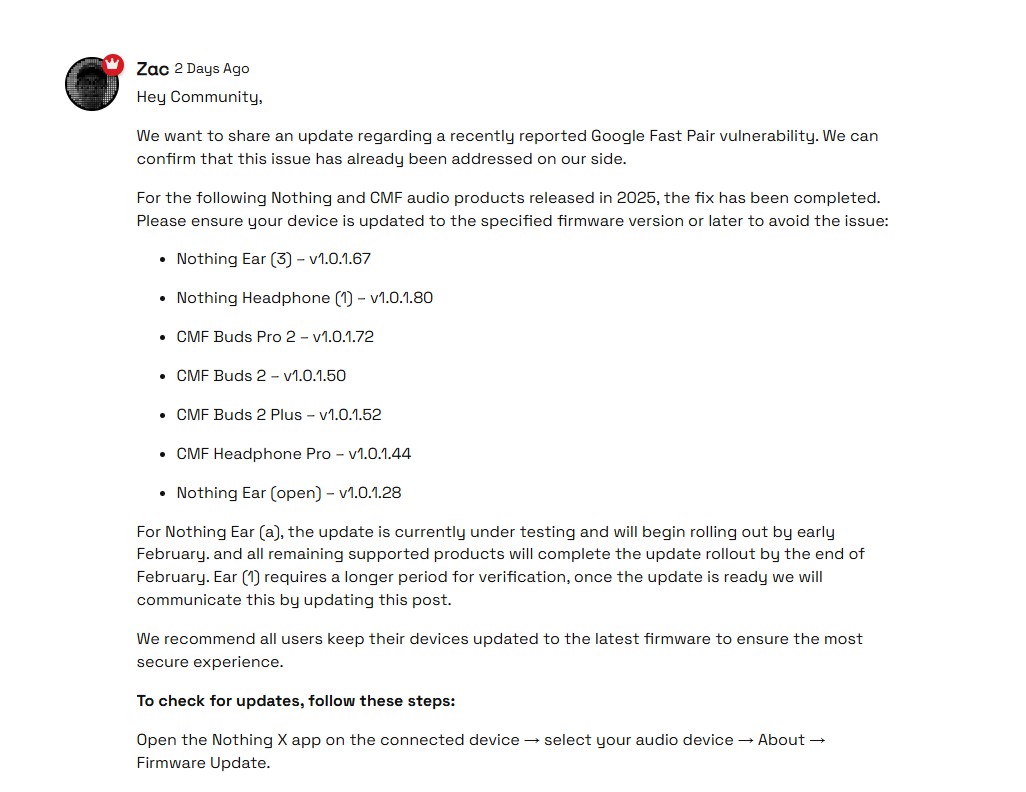
For the Nothing Ear (a), the update is still under testing, with the rollout expected to begin in early February. The company also stated that all remaining supported products should receive the update by the end of February. The Ear (1) will take longer, as it requires additional verification before the update can be released. Nothing said it will update the same community post once more information is available.
Firmware updates can be checked through the Nothing X app by selecting the connected audio device, going to About, and then opening Firmware Update.
