

ColorOS 16 Now Being Offered for OPPO Find N3 [ID], Find N3 Flip [IN], and Pad 3 Pro [TH, VN, MY, SG, PH]: Stable Version Roll-Out Scheduled for Early Next Week

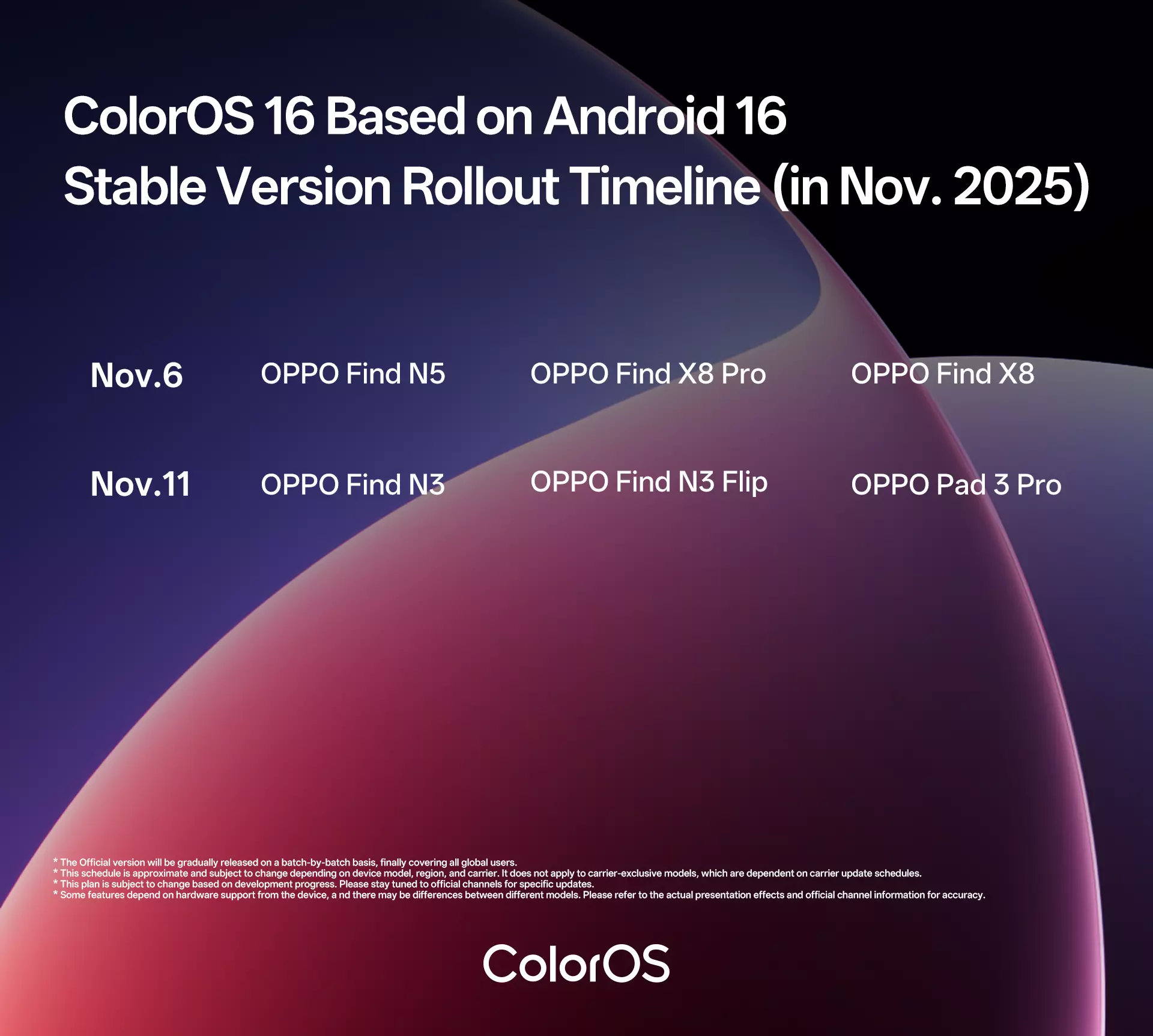
OPPO as part of its ColorOS 16 November 2025 scheduled roll-out has started offering its latest Android 16-based custom skin to more devices, and just recently the stable version was received by users of the Find N5, Find X8 Pro, and the Find X8 smartphones. Additionally, the update is also being offered for the Find N3, Find N3 Flip, and the Pad 3 Pro devices too in certain markets, whereas its stable version roll-out will be taking place early next week.
Here’s more about it.
OPPO’s Find N3, Find N3 Flip, and Pad 3 Pro – Getting Android 16-Based ColorOS 16
For OPPO Find N3 in Indonesia; for OPPO Find N3 Flip in India; and for OPPO Pad 3 Pro in Thailand, Vietnam, Malaysia, Singapore, and Philippines, the ColorOS 16 update is currently being offered and eligible candidates can apply for it by visiting ‘Settings’ > click on ‘System & update’ > press ‘Software update’ > tap on top of the page > tap on the icon at the top-right corner > select ‘Beta program’ > then select ‘Release candidate’ > and apply for it on ‘Apply now’. Following these steps, users can detect the update, download it, and install it on their respective devices (source: 1 | 2 | 3).
Detectable versions:
- OPPO Find N3 – CPH2499_15.0.0.870(EX01), CPH2499_15.0.0.860(EX01), and CPH2499_15.0.0.850(EX01)
- OPPO Find N3 Flip – CPH2519_15.0.0.860(EX01), CPH2519_15.0.0.870(EX01), CPH2519_15.0.0.880(EX01), CPH2519_15.0.0.890(EX01), and CPH2519_15.0.0.891(EX01)
- OPPO Pad 3 Pro – OPD2402_15.0.0.1301(EX01)
Also to note, the official stable version roll-out to these above-mentioned devices will happen next week on the 11th of November 2025 (source: 4).
As always, users before updating are advised to backup their personal information to prevent any data loss. Users may find heating and lagging issues following the update, which is due to the optimizations the device(s) are going through, and to resolve they just have to turn off the device(s) and charge for the whole night. Compatibility issues may be seen on certain third-party apps, and this is because the apps have not been optimized for Android 16. If users come across unexpected bugs or issues, they can also report them by dialing ‘*#800#’.
