


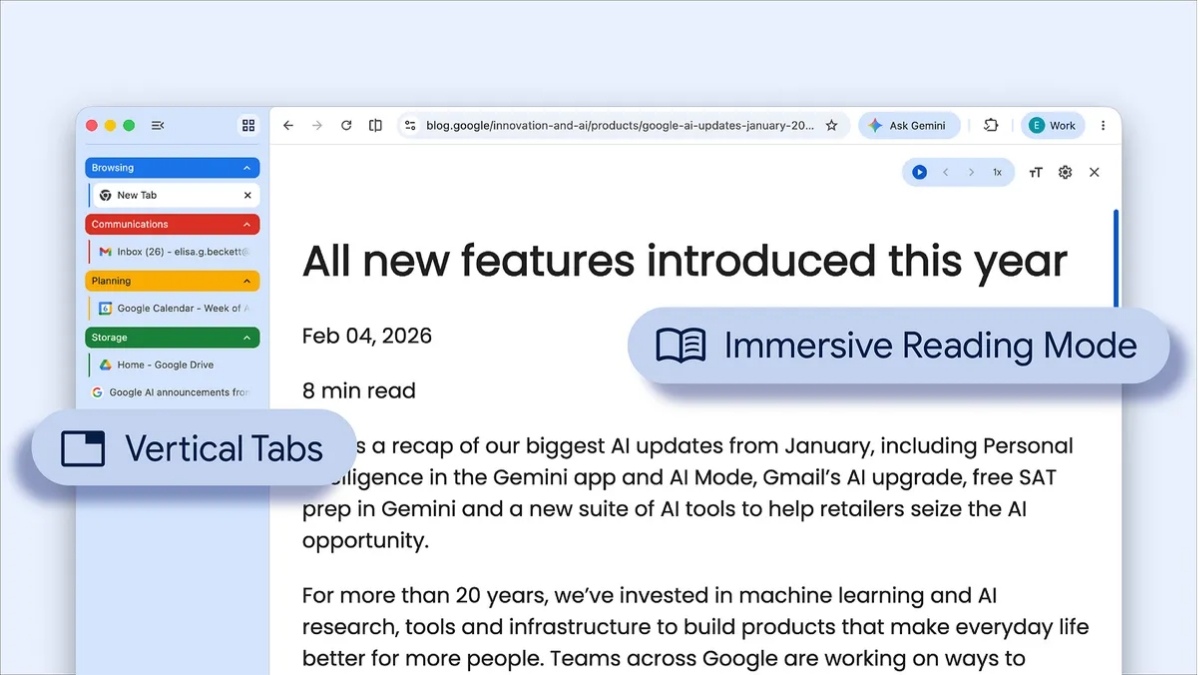
To streamline your browser and help you maximise productivity in Chrome, Google has started rolling out two new features- Vertical Tabs and Immersive Reading Mode.
Introducing a top-to-bottom update for your tabs…literally. Vertical tabs are coming to Chrome! 🚦
And there is more: A full-page view free from distraction with a new immersive reading mode. pic.twitter.com/axBqBNlnbW
— Chrome (@googlechrome) April 7, 2026
Google Chrome: Vertical Tabs and Immersive Reading Mode
Vertical Tabs
Users now have the option to use vertical tabs in Chrome, depending on their preferences. Just right-click on any Chrome window and select “Show Tabs Vertically.” With this new feature, you can move your tabs to the side of your browser window, you can read full page titles and manage tab groups with ease.
This will help users in multitasking, saving their time by making sure they never lose a tab.
Immersive Reading Mode
The reading mode in Chrome now comes with a new full-page interface. Right-click on any page and select “Open in reading mode” to remove visual distractions and transform a busy webpage into an immersive, text-focused reading experience.
In related news, last month Google officially announced that it is rolling out many of Chrome’s latest AI features, including Gemini in Chrome, to India, New Zealand and Canada. The company also rolled out support for more than 50 additional languages, including Hindi, French and Spanish.
Stay tuned with The Tech Outlook for the latest tech updates.
