

Essential Space gets two new updates; Readability from clipboard and a save button for edits

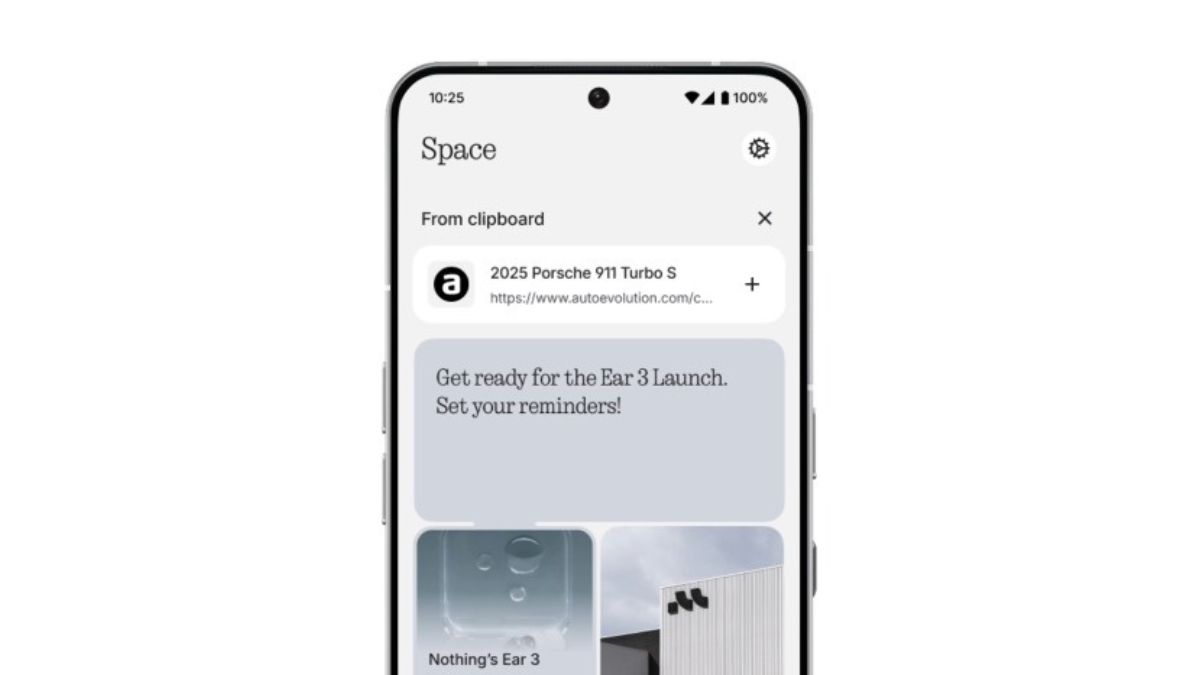
Nothing has been releasing new upgrades and features for the Essential Space to enhance user experience and make the work of users simple and easy. The company released two new updates yesterday for the Essential Space.
We heard you: Essential Space gets smarter, again 🚀
📋Essential Space now reads your clipboard!
Copy a URL, text, or even an image. Open Essential Space, and you can instantly create a collection!
Analyse, save, and summarise without lifting a finger 🧙🏻♂️ pic.twitter.com/4XLrqWwbjZ
— Essential (@essential) September 16, 2025
Essential Space: New updates
Essential Space can now read your clipboard
Copy a URL, text, or even an image. Open Essential Space, and you can instantly create a collection. Analyze, save, and summarize without lifting a finger.
Essential Space just got a save button for your edits
Editing text in Essential Space now feels effortless. After editing, a yellow checkmark appears in the top right corner. On tapping the checkmark, your changes will be saved instantly.
How to get these updates?
The rollout for these updates started yesterday. If auto-update is enabled, just connect your device to WiFi, and Essential Space will update automatically through the Play Store.
If auto-update is disabled, head over to the Play Store and hit update manually.
Other recent Nothing updates
Nothing will officially introduce its Nothing Ear (3) tomorrow. Recent updates revealed that the charging case for this earbud will arrive with a TALK button and built-in supermic. The earbud was spotted today on the IMDA database alongside CMF Headphone Pro. The company has also teased the launch of Nothing OS 4.0 previously.
Yesterday, it was officially announced that Nothing has raised $200 million in a Series C funding round, bringing the valuation of the company to $1.3 billion.
