

Apple developers can now log into their Claude account from Xcode in Xcode 26 Beta 7

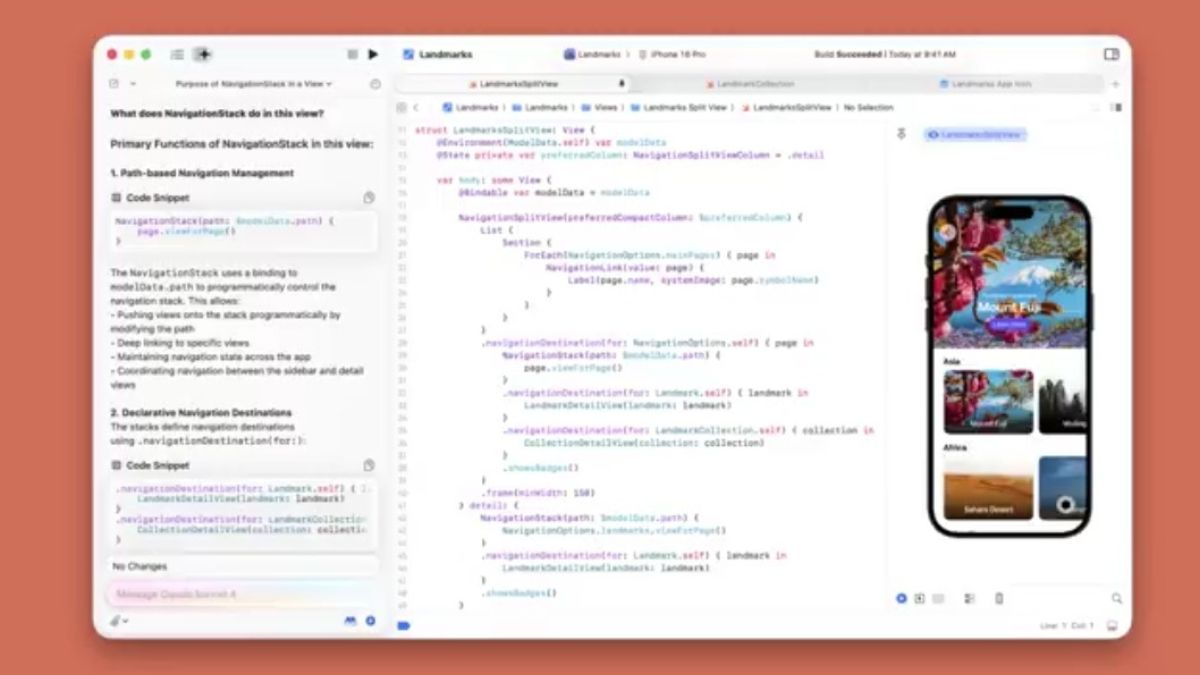
Apple has released a new Xcode 26 Beta 7 update for developers. This beta update includes SDKs for iOS 26, iPadOS 26, tvOS 26, watchOS 26, macOS Tahoe 26, and visionOS 26. The Xcode 26 Beta 7 release supports on-device debugging in iOS 16 and later, tvOS 16 and later, watchOS 8 and later, and visionOS. It requires a Mac running macOS Sequoia 15.5 or later.
New in Xcode 26 Beta 7: Users can now log into their Claude account from Xcode.
Generate code and documentation, automatically fix errors, and create inline playgrounds using coding intelligence features in Xcode, powered by Claude Sonnet 4. pic.twitter.com/38SicHtEMm
— Claude (@claudeai) August 28, 2025
Apple developers can now log into their Claude account from Xcode. You can generate code and documentation, automatically fix errors, and create inline playgrounds using coding intelligence features in Xcode, powered by Claude Sonnet 4.
The Xcode 26 beta 7 arrives with new features in coding intelligence and various known issues. Check it out below.
General
Known Issues
- The Related Items menu has been simplified to items to improve editor load times. Assistant Categories like Callers are still available in the Assistant Editor. There is also similar functionality available via editor context menus or in the Find Navigator. (147335052)
- Simulators may fail to boot during the first build after upgrading macOS; rebuilding after a short wait typically resolves the issue. (152328794)
- Sometimes the “Cancel” button in the Coding Assistant status bar fails to stop the currently executing message. (152546155)
Workaround: Use the Coding Assistant navigator directly, and click “Cancel”.
- Users updating from earlier Xcode 26 betas may experience an error such as “fatal error: ‘iostream’ file not found” when using C++ standard headers. (152924178) (FB17859821)
Workaround: In Terminal, execute the command:
sudo rm -rf /Library/Developer/CommandLineTools/usr/include/c++/v1
Address Sanitizer
Known Issues
- Address Sanitizer C++ container overflow checks are no longer disabled by default and cannot be disabled at compile time from Xcode build settings. (157770563)
Workaround: Disable the checks at run time by setting the ASAN_OPTIONS environment variable to detect_container_overflow=0 or adding it to your existing ASAN_OPTIONS. Add this setting to the Environment Variables list in the Arguments tab of the Run scheme in the scheme editor and in the Configurations tab of any Test Plan that uses Address Sanitizer.
App Intents
Known Issues
- UISceneAppIntent.performNavigation(forScene:) is not always called.
Background Assets
Known Issues
- When running the mock server (ba-serve), the Choose Identity panel might appear behind all other windows and be absent in Mission Control. (152256482)
Workaround: Move all other windows out of the way to reveal the panel.
Code Assistant
Known Issues
- Remote model configuration fields clear when Xcode loses focus. (157071086)
Workaround: Complete model setup without switching away from Xcode.
Coding Intelligence
New Features
- Claude in Xcode is now available in the Intelligence settings panel, allowing users to seamlessly add their existing paid Claude account to Xcode and start using Claude Sonnet 4. (155826755)
- When using ChatGPT in Xcode, users can now start a new conversation with either GPT-4.1 or GPT-5, with GPT-5 set as the default. (158342780)
- ChatGPT in Xcode provides two model choices. “GPT-5” is optimized for quick, high-quality results and should work well for most coding tasks. For difficult tasks, choose “GPT-5 (Reasoning)“, which spends more time thinking before responding, and can provide more accurate results for complex coding tasks.
In the OpenAI API, “GPT-5” corresponds to the “minimal” reasoning level, and “GPT-5 (Reasoning)” corresponds to the “low” reasoning level. (159135374)
Known Issues
- When applying changes using coding intelligence, breakpoints in affected files may move. (146888202)
- When using coding intelligence, the model is unable to view or modify files with identical names simultaneously. (147450585)
- Previously deleted files may appear in the modification history as having been deleted by a recent coding assistant conversation. (152545638)
- Coding intelligence provides inconsistent results when modifying files that contain thousands of lines. (152590014)
Group Activities
Known Issues
- The DestinationVideo sample code doesn’t compile. (147074640)
Workaround: Replace import GroupActivities with @preconcurrency import GroupActivities.
Icon Composer
Known Issues
- Exporting a single PNG, or using the “Copy Icon as Image” menu item, for Clear Light, Clear Dark, Tinted Light, or Tinted Dark will produce an unexpected dark image. (148998556)
Workaround: Use the export all functionality from the export sheet.
Instruments
Known Issues
- No data is present when recording the CPU Counters on macOS devices in the “Streaming SME Bottlenecks” or “Instruction Processing Bottlenecks” modes. (152179757)
Metal
Known Issues
- GPU Profiling in Metal Debugger is not available for Metal 4. (136244517)
- Metal 4: Sparse resources are not supported in the Metal Debugger. (136326816)
- Shader Debugging in Metal Debugger is not available for Metal 4. (136626557)
- Compiling Metal shaders with the latest Xcode 26 Metal toolchain for iOS 18, macOS 15, tvOS 18, and visionOS 2 deployment targets may not produce valid GPU binaries. (150887778)
Workaround: Use the previous Xcode 16.3 Metal toolchain to compile Metal shaders to GPU binaries for those deployment targets.
Playgrounds
Known Issues
- Canvas doesn’t show results for #Playground blocks in “Legacy Previews Execution”. (150811580)
Reality Composer Pro
Known Issues
- The Send to Device toolbar item’s down arrow does not draw correctly. (147957053)
Workaround: You can still click the toolbar item to access the Send to Device menu. Alternatively, you can use File > Device in the menu bar.
Source Editor
Known Issues
- Change bars may be out of date when reverting changes from the coding assistant. (152399120)
Swift Splash
Known Issues
- The Swift Splash sample app may crash on launch. (155922631)
Testing
Known Issues
- Swift Testing exit tests may produce crash logs in /Library/. (47982238)
- Attachments are not recorded from within the bodies of exit tests when using Swift Testing. (149242118)
